How to Let Customers Build Their Own Dashboards in Your App
Let customers build their own dashboards in your app: prep data first (BARC rates data quality 7.9/10 in importance), pick who builds, and plan for 5 breaks.
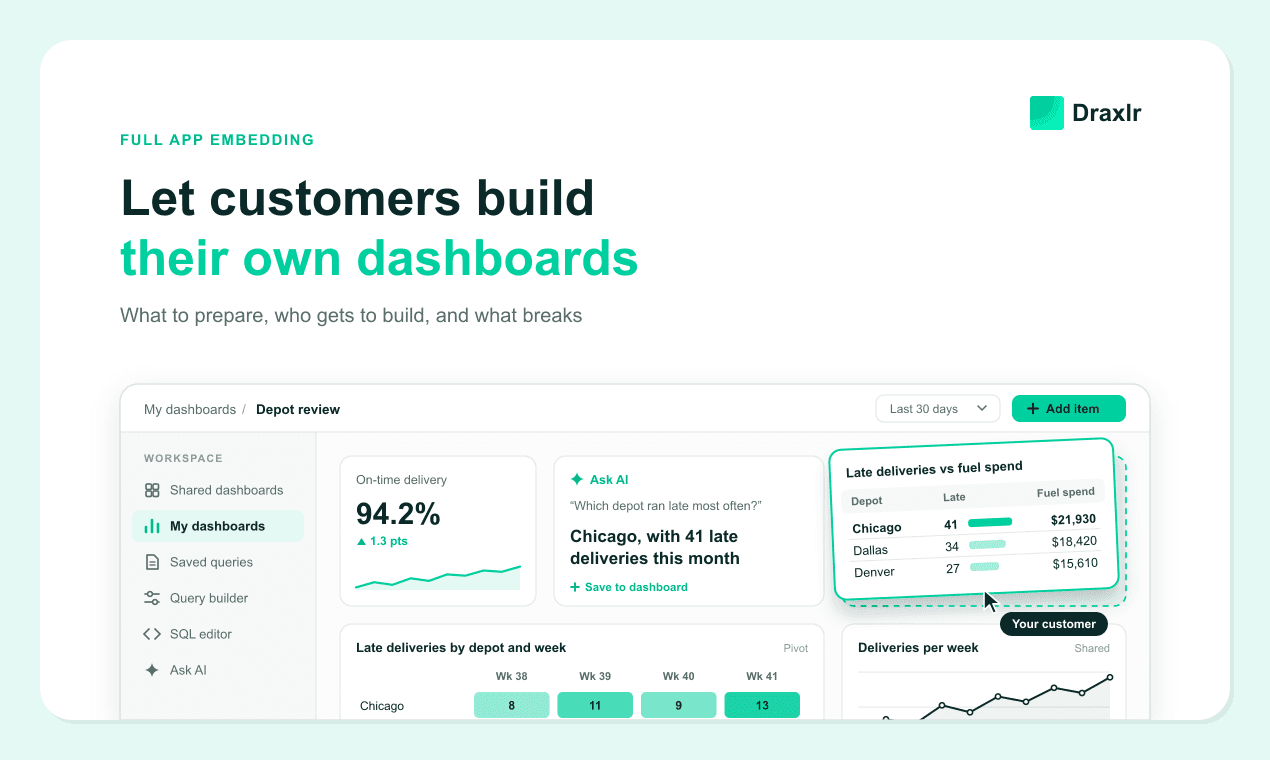
It's 4:15 on a Thursday. An operations manager at one of your customers, a regional freight company, has a depot review first thing Friday. Your shared dashboard shows their on-time delivery rate, but they need each depot's late deliveries next to its fuel spend, and nothing on the dashboard shows both. They pick the deliveries and fuel data, group both by depot, add a last-30-days filter and save the result as a table on their own dashboard. Your team never hears about it.
That's what it looks like when you let customers build their own dashboards inside your product. It sounds like a feature you switch on. In practice, it's a set of decisions about what data customers can see, who gets to build, and what happens when they build something wrong.
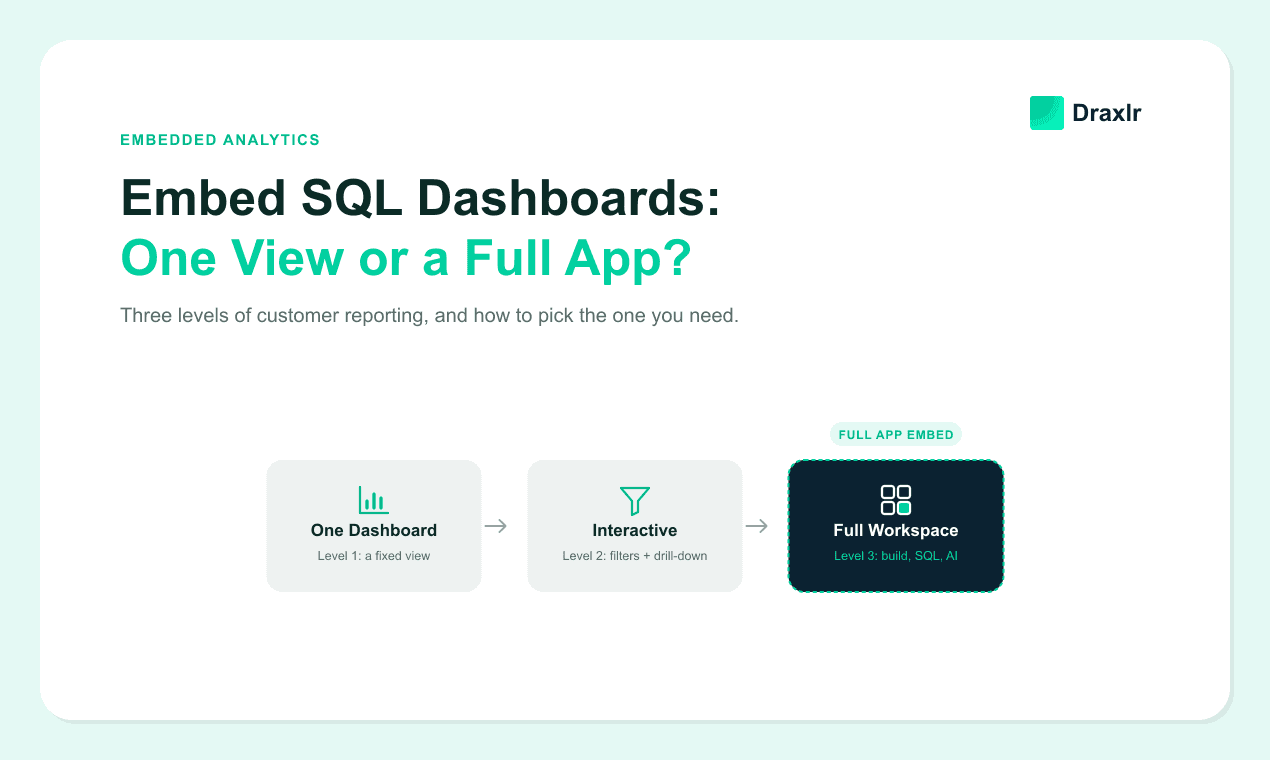
This guide walks through those decisions for founders, product managers and customer success leads. It applies to any vendor, and there's no code. If you're still deciding whether customers need a full workspace at all, start with our comparison of single-dashboard and full app embedding.
Key Takeaways
- Customer-built dashboards let each customer turn their own data into tables, charts, metrics and saved queries, in a workspace only their company can see.
- If customers only want your reports sliced differently, filters and drill-down are enough.
- Prepare your data first. In BARC's Trend Monitor 2026 survey of 1,579 participants on analytics inside companies, data quality management tied for the top importance score of 20 trends, ahead of self-service.
- Until your usage data says otherwise, plan for most people in an account to read, rerun or ask rather than build, and keep investing in shared dashboards.
What Does It Mean to Let Customers Build Their Own Dashboards?
Letting customers build their own dashboards means each customer can create reports from their own data and save them without asking your team. A report might be a table, a pivot, a single metric or a chart. They choose what to measure, how to group it, how to show it and where it sits on the page. Then it's theirs. The dashboard stays in their account, and only people at their company can see it.
That's different from filtering. On a dashboard your team built, a customer can change the date range or pick a region, but the tables and charts on it stay fixed. Building means the customer can create a report that didn't exist yesterday.
Customers usually build in one of three ways. The most approachable is a point-and-click query builder, where they pick data, filters and grouping from menus. Some write SQL. Others type a plain-English question to an AI assistant and keep the answer, whether it comes back as a number, a table or a chart. All three typically live in an embedded workspace, next to the shared dashboards you publish for every customer. Some vendors call this setup full app embedding; others call it self-service embedded analytics.
Do Your Customers Need to Build Dashboards, or Just Filter Them?
Many SaaS products don't need customer-built dashboards. If customers ask the same questions and only want the answers sliced differently, interactive dashboards with filters and drill-down cover it for less money and less support. Building pays off when accounts ask different questions from each other.
Here's what customers can do at each level, from one fixed dashboard to a full workspace:
| What the customer can do | One fixed dashboard | Interactive dashboards | Full workspace |
|---|---|---|---|
| See the numbers you chose | Yes | Yes | Yes |
| Filter by date, region, team or product | Date range at most | Yes | Yes |
| Click a number or chart to see the records behind it | No | Yes | Yes |
| Export results to a spreadsheet | Sometimes | Usually | If you allow it |
| Create a new table, chart or metric from scratch | No | No | Yes |
| Save their own dashboards and queries | No | No | Yes |
| Write SQL or ask an AI assistant | No | No | If you turn it on |
| Answer a brand-new question themselves | No | No | Yes |
Filters on your own dashboards are enough when most of these are true:
- Top requests start with "Can I see this by…", which a filter answers.
- Accounts look alike, with similar size, workflows and metrics.
- Customers check reports on a schedule rather than investigate problems.
- Requests for a genuinely new report are rare, a few per quarter across all accounts.
You need customer-built dashboards when requests sound more like these:
- "Can I put late deliveries and fuel spend on one page?"
- "Can I track something none of your dashboards cover yet?"
- "Can I compare late deliveries by route against the same month last year?"
- "Can our analyst check a hunch without filing a ticket?"
If the second list sounds familiar, our guide to signs your customers are ready for self-serve analytics shows how to confirm it from your support queue.
Five People, One Customer Workspace
Customer-built dashboards serve different people in one account in different ways. Picture that freight company again, with five people using your product in the same week:
- The COO reads the shared "Weekly operations" dashboard. That's all, and that's fine.
- The operations manager builds a "late deliveries vs. fuel spend by depot" table in the query builder and saves it next to the pivot and trend chart they built last month.
- The finance lead reruns a saved query, "Fuel surcharges by customer, this quarter," and exports it for the board pack.
- The analyst suspects late deliveries cluster on one route. A short SQL query checks it, and saving it lets the ops manager rerun it next week without asking.
- A new dispatcher types "How many deliveries were late yesterday?" into the AI assistant.
Count what each person does. Two people build from scratch, one reruns saved work, and two only read or ask. Your accounts will vary, but plan for a similar split until your own usage data says otherwise. Shared dashboards are the part anyone in the account can use on day one, so treat them as the front page of the workspace and keep improving them after launch.
Prepare Your Data Before Customers Start Building
Customers can only build on data they trust. The analyst firm BARC surveyed 1,579 participants for its Data, BI and Analytics Trend Monitor 2026. Data quality management averaged 7.9 out of 10 for importance, tying with data security and privacy for first of 20 trends. Self-service analytics and data discovery averaged 6.5, tied with data and AI literacy for fifth.
BARC's survey asked about analytics inside companies, not about SaaS customers. If your customers' staff bring the same priorities to your product, they'll want numbers they can trust before they want more ways to build. Self-service did score higher at the most successful companies. BARC's best-in-class group, the top 10% by business benefits achieved, rated it 7.5, against 6.1 for the bottom 10%.
Here's what to prepare before the first customer builds anything:
| What to prepare | Why it matters | Who usually owns it |
|---|---|---|
| Choose which tables customers can see | Internal tables, such as billing details or audit logs, confuse customers and can expose things you never meant to share | Product and engineering |
| Rename columns in plain English | "cust_acct_id" means nothing to an ops manager, while "Account" does | Product |
| Define official metrics once | If "on-time delivery" can be counted three ways, customers will find all three | Product and your data lead |
| Publish three to five shared dashboards | They answer common questions and give builders something to copy and adapt | Customer success and product |
| Limit each customer to their own rows | Everything a customer builds, including SQL and AI answers, has to stay inside their data | Engineering |
| Agree on stable reporting tables | Customer dashboards break when a column they use is renamed or removed | Engineering |
Stable reporting tables are the easiest item to overlook. Before customers could build, engineers only had to keep your own dashboards working when they changed the database. Now customers' own tables, charts and saved queries depend on the same columns, and your team may never look at them. A five-minute rename can quietly break dozens, so agree on a short list of reporting tables that won't change without notice.
Keeping customers apart is the part you can't get wrong. Our guide to row-level security for multi-tenant analytics explains how each customer stays limited to their own rows.
Which Tools Should Customers Get, and Whose Workspace Is It?
Decide which tools each plan gets, then decide whether a workspace belongs to a company or to a person. Those two choices shape cost, risk and support load more than any feature list does. Start simple. Gate tools by plan, and give every user on a qualifying account the same set.
Decision 1: Which tools each plan gets
Each tool suits different people and costs you something different to support:
| Tool | Best for | Watch out for |
|---|---|---|
| Query builder (menus, no code) | Ops managers and team leads | Only as good as the tables and names you expose |
| SQL editor | Analysts and technical staff | Heavy queries that slow things down |
| AI assistant | Occasional users with one-off questions | Usage costs, and answers that need checking |
| Exports | Finance and board reporting | Data leaves your product once it's downloaded |
The query builder is the safest place to start. Add the SQL editor once analysts or developers on your customers' teams ask for it. Many already work in SQL. In Stack Overflow's 2025 Developer Survey, 58.6% of respondents reported extensive development work in SQL over the past year.
Decision 2: Whose workspace it is
A workspace can belong to a whole customer company or to one person. With a company-wide workspace, the ops manager's new depot table is instantly visible to the COO. That helps collaboration, but it gets cluttered at a 200-person customer. Personal workspaces stay tidy. Sharing a good dashboard with a colleague, though, can take extra steps or may not be possible, so ask your vendor.
For most B2B products, one workspace per customer company is the simpler start. Either way, your product tells the workspace who's signed in each time it loads, usually through a signed token. Our explainer on secure token-based dashboard embedding covers what to check; for the engineering side, see our walkthrough for adding self-serve customer-facing analytics.
What Breaks When Customers Build Their Own Dashboards?
Most problems with customer-built dashboards appear after launch, not in the demo. Five are worth planning for, and each is cheaper to prevent than to clean up:
- The empty workspace. Customers open a blank canvas, don't know where to start, and leave. Plenty of software features go unused. In its 2019 Feature Adoption Report, product analytics company Pendo found that 80% of features in the average software product are rarely or never used. That figure comes from three months of anonymized usage data across 615 subscriptions. Give every customer a starting point, such as shared dashboards they can copy.
- Two answers to the same question. A customer builds their own "on-time rate" with slightly different rules, and it disagrees with your shared dashboard. Label shared dashboards as the official numbers, and offer those official metrics in the builder under the same names.
- Dashboard sprawl. After six months, a busy account can collect dozens of near-identical dashboards, many of them never opened again. Ask your vendor whether you can see which customer dashboards get opened, then help accounts tidy up at renewal time.
- Broken reports after a database change. A renamed or removed column breaks every customer-built table, chart and saved query that uses it. Keep a list of stable reporting tables, and tell customers before anything on it changes.
- Surprise usage costs. Some vendors count customer-created queries and dashboards toward your plan limits, and AI questions often draw on usage credits. Estimate what an active account creates in a month before you price the feature.
Is any of this a reason not to offer building? Usually not. It's a reason to put a monthly review on someone's calendar. At each review, check which customer dashboards get opened, where customers have redefined an official metric, and which reports several accounts have built separately.
Getting Customers to Their First Saved Dashboard
Choose a few pilot accounts that already send you custom report requests, and aim to get each one to a saved dashboard in its first week. That first save is the clearest early sign the feature fits how customers work. Give each workspace shared dashboards to copy, then:
- Book a 20-minute session with each account's likeliest builder. Answer their first question together, using one from their own support tickets.
- Publish a one-page help article with five example questions, written the way customers phrase them.
- When three accounts build the same report, add it to your shared dashboards for everyone.
After the first save, watch return visits: a dashboard someone opens again a week later is doing real work. One that's saved and never reopened was an experiment.
If pilots rarely save or reopen dashboards and report tickets don't fall, go back to filters on shared dashboards. That's a fine outcome. It's also cheaper than paying for building tools that sit idle.
Vendor Questions Specific to Customer-Built Dashboards
Ask vendors what happens after customers start building, because many checklists stop at price and security, and a short demo rarely shows it. These questions cover that gap:
- Can customers copy a shared dashboard and change their copy without affecting anyone else?
- What happens to customer-built reports and saved queries when we rename or remove a column? Ask how broken ones get flagged, and to whom.
- Can we let some people in an account build while others only view?
- Can customers share a dashboard with colleagues in their own company, and never outside it?
- Who inside a customer account can edit or delete a dashboard a colleague built?
- Do customer-created queries and dashboards count toward our plan limits?
- Does row-level security apply to everything customers build, including SQL queries and AI answers?
- Can we see which customer dashboards get opened, so we can promote or retire them?
- Can we cap how long a customer's query runs or how many rows it returns? One heavy SQL query shouldn't slow your database for every other customer.
As one example, Draxlr, which publishes this guide, offers full app embedding on its Power plan ($250 a month) and above. Each customer gets a separate workspace with your shared dashboards, their own dashboards and saved queries, a no-code query builder, a SQL editor and an AI assistant. You choose which features customers get, and row-level security keeps each customer to their own rows. Single-dashboard embedding, with filters, drill-downs and exports, starts on the Premium plan at $75 a month.
Run the cost at next year's customer count, not today's. Our embedded analytics budget guide lists the costs that are easy to miss, and our roundup of customer-facing SQL analytics tools helps with a shortlist.
Frequently Asked Questions
What's the difference between filtering a dashboard and building one?
Filtering changes the view of a report your team built, such as its date range or region. Building means the customer creates a new table, chart or metric from their own data and saves it to their own dashboard. Filters answer "show me this by X." Building answers questions your team never designed a report for.
When shouldn't you let customers build their own dashboards?
Skip it when most accounts ask the same questions and only want the answers sliced differently. Interactive dashboards with filters, drill-down and exports cover that for less cost and support. Also wait if your data isn't tidy yet. Customers will build on whatever confusing tables and column names you expose, and they'll file tickets about the results.
Can customers see each other's dashboards?
Not if the workspace is set up correctly. Row-level security should limit every table, chart, saved query and AI answer to that customer's rows. Inside one customer company, sharing depends on whether the workspace belongs to the company or to each person.
What happens to customer-built dashboards when your database changes?
They can break. If your team renames or removes a column that a customer's table, chart or saved query uses, it may stop working without anyone at your company noticing. Keep a stable set of reporting tables, and warn customers before changes.
Conclusion
Letting customers build their own dashboards starts with data they can understand and columns that won't move under them. Decide who builds and whose workspace it is, then plan for empty canvases, conflicting numbers and broken reports. Run a small pilot and watch return visits. If pilot accounts reopen what they built a week later, widen the rollout. If they don't, put that effort into sharper shared dashboards.
About the author

Vivek is a coder and the founder of Draxlr who cares deeply about building good products. He works at the intersection of AI, SQL, dashboards, and embedded analytics, with a strong focus on making complex data workflows feel simple, useful, and fast for real teams.
If you have questions about anything in this guide, or want to compare options for your specific stack, you can email Vivek at vivek@draxlr.com, try Draxlr free, or reach out directly through the Draxlr team.