Let Your Support Team Query the Database in Claude or ChatGPT Without Sharing Credentials
Let your support team query the database in Claude or ChatGPT without sharing credentials. GitGuardian found 24,008 secrets in public MCP config files.
Ping.
Jared (support): "Can someone look up erlich.bachman@example.com? Says they paid, but their order is stuck on pending."
Gilfoyle (engineering): "Fine."
Forty minutes later.
Gilfoyle: "Two orders. #8813 is paid. #8812 is a duplicate nobody paid for."
Jared: "You're a gift. I've got three more like that."
Gilfoyle: "...Here's the read-only connection string. Add it to Claude and ask it yourself."
Sound familiar? You can let your support team query the database in Claude or ChatGPT without sharing credentials. Gilfoyle's shortcut just isn't the way to do it.
It feels like a win. Jared gets answers in plain English, and Gilfoyle gets the afternoon back.
But that connection string now lives in Slack and in Jared's Claude config. By Friday it's on three more laptops. Passwords are like glitter: share one once and you'll keep finding it for years.
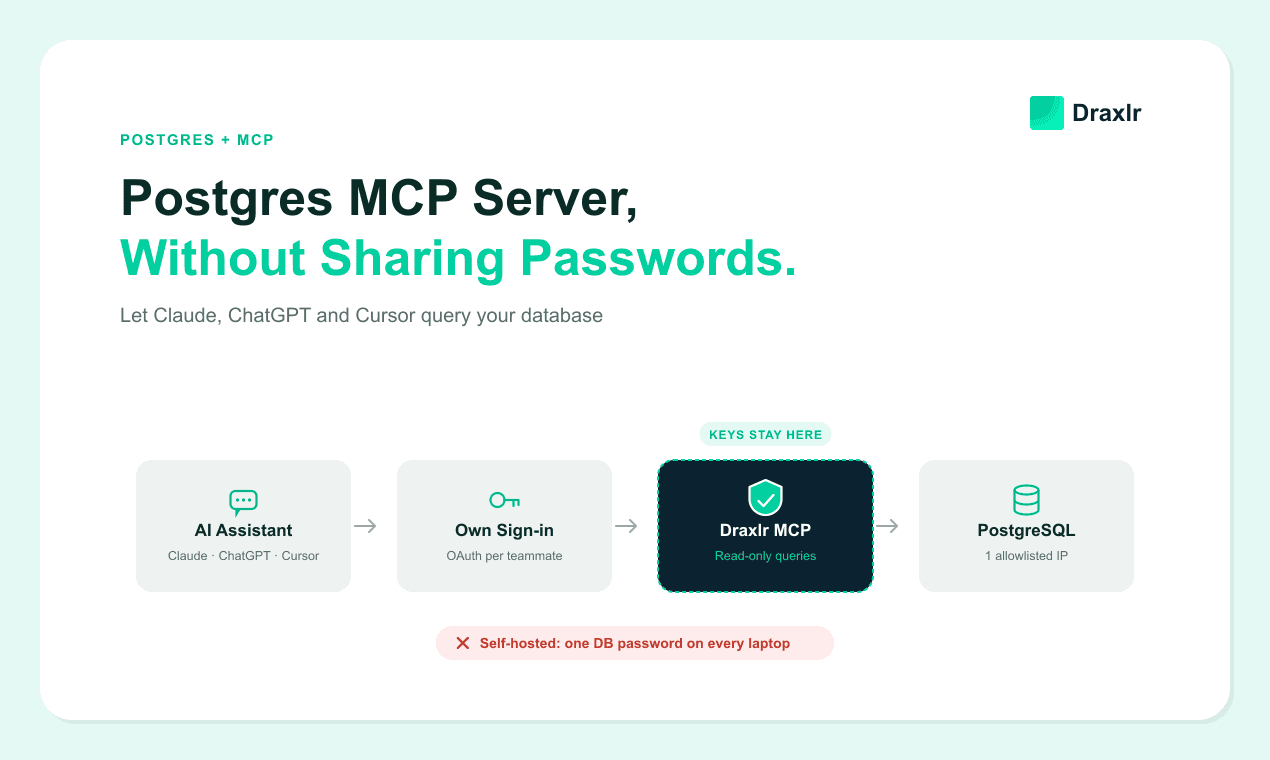
This guide shows the better route. Claude or ChatGPT connects through Draxlr's MCP server, so nobody pastes a password anywhere. Row-level security keeps critical tables off-limits.
Key Takeaways
- Don't paste the database connection string into Claude or ChatGPT. Connect the assistant through an MCP server that holds the only copy, and have each agent sign in as themselves.
- Pasted credentials spread. GitGuardian's March 2026 report counted 24,008 secrets in MCP configuration files on public GitHub, 2,117 of them still valid.
- With Draxlr's MCP server on the Power plan, row-level security keeps critical tables away from an agent's assistant and narrows the rows it can query. Removing an agent cuts off their assistant on its next request.
Why Support Teams Want Claude and ChatGPT on the Database
Most SaaS databases look alike underneath: users, their orders, their bookings, their logins. And many support tickets boil down to one question about one user's rows.
An AI assistant connected to that database answers those questions in plain English. No SQL, and no waiting on engineering.
Agents ask things like:
- "Show erlich.bachman@example.com's orders from the last 7 days, with status and payment."
- "Why can't this user log in? When did they sign up?"
- "Was the Friday 6 pm booking for user 4471 cancelled, and by whom?"
- "How many bookings has this user cancelled in the last 90 days?"
- "Which of this user's orders were refunded this year?"
The assistant writes and runs the SQL, then explains the answer. The agent never touches a query.
Most of the risk lives in the connection. How the assistant reaches your database decides who holds the password and what it can see. It also decides how fast you can take access away.
What Goes Wrong When You Paste Database Credentials Into Claude?
The connection string gets copied everywhere, and you lose track of it.
GitGuardian has seen this at scale. Its State of Secrets Sprawl 2026 report (March 2026) found 24,008 unique secrets in MCP-related configuration files on public GitHub. Of those, 2,117 were valid credentials.
Part of the blame goes to the docs. The report notes that popular MCP setup guides often tell people to put secrets straight into config files, command-line arguments or connection strings.
For a support team, it plays out like this:
- Every agent holds the password. A database MCP server running on a laptop needs the connection string in that laptop's config. It travels through chat first. GitGuardian found about 28% of incidents start outside code repositories, in tools like Slack, Jira and Confluence, where secrets get passed around "during urgent troubleshooting."
- ChatGPT fans are left out. ChatGPT reaches MCP servers only over HTTPS, so it can't see a server running on an agent's laptop.
- "Read-only" still reads everything. A typical read-only login can't change data. It can still read every user's email, phone number and card last-four digits.
- Agents look identical. The database sees one user. Who ran that query? Nobody knows.
- Leaving doesn't end access. The ex-agent's laptop still has the string, and changing the password means updating everyone else.
Self-hosted servers bring their own surprises. In 2026, independent researcher Maximilian Hildebrand found read-only bypasses across 14 SQL MCP servers. Our guide to enforcing read-only, tenant-aware MCP access walks through how they happen.
The stakes are real, too. The Center for Internet Security's summary of Verizon's 2026 Data Breach Investigations Report notes that credential abuse appeared in the attack chain of 39% of breaches.
We tested what a pasted support login can do
In October 2026 we spun up a throwaway PostgreSQL 18 database for a pretend app with three customer accounts. We gave a "support" login PostgreSQL's built-in role for reading all data, a standard way to make a login read-only. Then we poked at it:
- Edits were blocked. A delete was refused with a permission error.
- Everything else was visible. The login read the end-customer emails, phone numbers and card last-four digits stored for all three accounts, not just the account on the ticket.
- Two people looked like one. Two sessions open at once both appeared as the same user. Each connection sets its own name tag, so one agent could pose as a colleague.
- Changing the password didn't end access. New logins with the old password failed, but a session that was already open kept reading data afterwards.
- There was no time limit. The query timeout was switched off by default.
The all-accounts finding isn't a fluke. PostgreSQL's documentation on predefined roles says the read-all role reads every table, view and sequence "as if having SELECT rights on those objects."
Our guide to Postgres MCP servers and the risks of self-hosting covers the rest of the self-hosting headaches, from IP allowlists to plain-text config files.
How Does Draxlr's MCP Server Take the Password Out of the Picture?
Draxlr's MCP server holds the only connection support uses. Each agent adds one URL to Claude or ChatGPT and signs in with their own Draxlr account.
You connect the database to Draxlr once, using a database user that can only run SELECT queries. Draxlr keeps that one copy of the login, and query results pass through it on the way to the assistant.
The assistant holds only a sign-in token. It never sees the user name or the password, and neither do your agents.
Read-only works in two layers. The MCP server turns away anything that isn't a read statement. Inside the database, the SELECT-only user can't write at all. A write would have to get past both.
Each agent also gets an access level. Read members can ask new questions and rerun saved queries and dashboards, but can't save anything. Dashboard members see only the dashboards assigned to them.
When an agent leaves, remove them from your Draxlr team. Draxlr confirms the person is still an active member on every request, so their assistant goes quiet on its next question. There's no password to rotate, and no one else has to touch their setup.
How Row-Level Security Blocks Critical Tables and Narrows Rows
Row-level security (RLS) in Draxlr decides which tables and rows each agent's assistant can query. A permission lists the tables an agent may use and adds row filters to them.
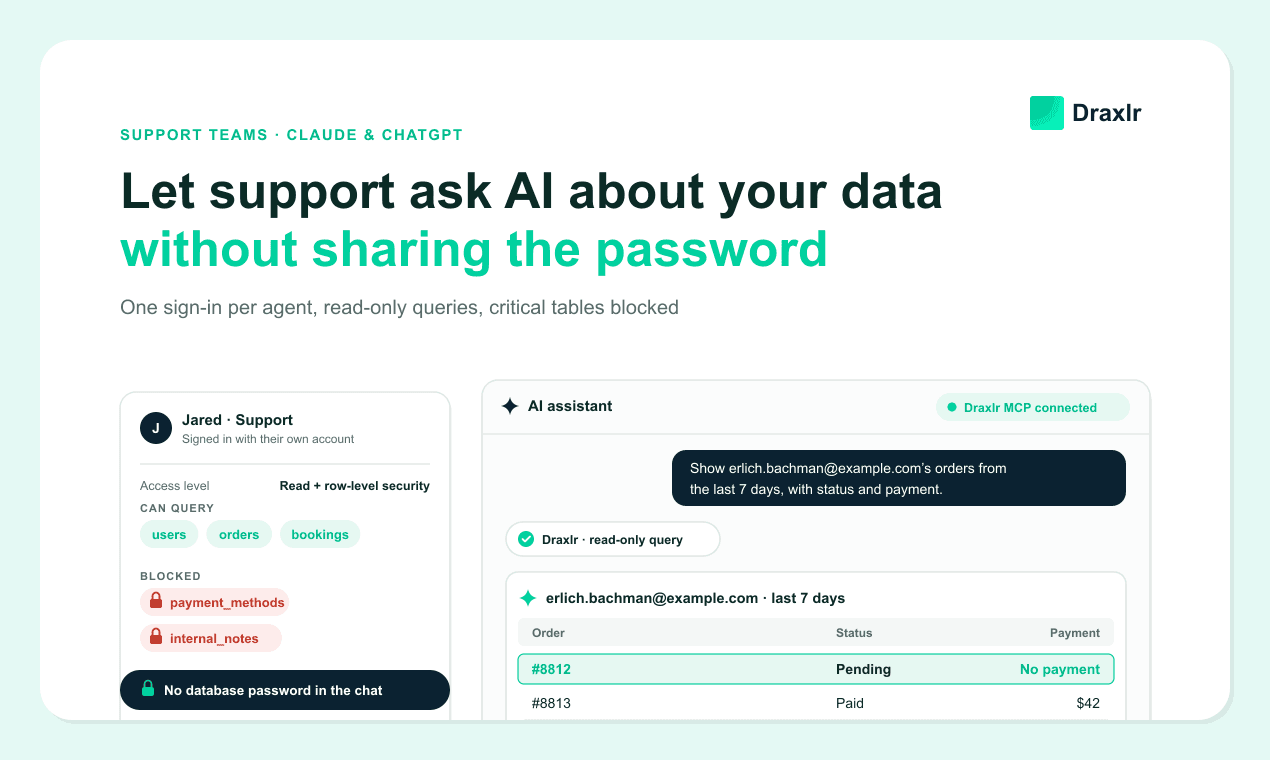
Start with tables. Leave critical ones out of the support permission: stored payment methods, internal notes, staff data, API keys. If the assistant writes a query that touches one, it's refused before it runs.
Got sensitive columns inside a table support needs? Ask your engineers whether they can live in a separate table the permission leaves out. It's a bigger change, so save it for data like government IDs or bank details.
Then add row filters where they help. A filter can narrow an agent's results to users in their own region, or drop test and internal accounts. The value can come from an attribute on each agent, like team or region, so one permission covers the whole team.
Treat the table list as your hard line. If an agent should never see something, put it in a table they can't query, not behind a row filter.
Then back it up with the database user's own grants. If the support tables are the only ones that user can read, a critical table stays safe even if someone sets up a permission wrong.
The GDPR agrees. Article 25(2) asks that, by default, only the personal data needed for each purpose is processed, and it applies that rule to who can access the data.
Setting Up Claude or ChatGPT for a Support Team
An engineer does the first step once. Everything after that happens in Draxlr and in each agent's assistant.
- Create a database user for support. Give it SELECT access only, and only on the tables support needs.
- Connect that user to Draxlr. Add the database with its host, port, name and the new user.
- Invite your agents. On Power, put them in an RLS group whose permission leaves out critical tables and filters rows. On Premium, give them Read access and rely on the database user's grants, since every Read agent sees all rows in those tables.
- Save the queries behind your most common tickets. Think "Orders for a user, last 7 days" or "Booking history for a user." An assistant can find saved queries by name and rerun them, so every agent runs the same query.
- Have each agent connect their assistant. In Claude, add a custom connector with the URL
https://api.draxlr.com/mcp, or add Draxlr from the Claude Directory, then sign in. In ChatGPT, turn on Developer mode, create an app with the same URL and OAuth, then sign in.
ChatGPT's Developer mode is available on Plus, Pro, Business, Enterprise and Education plans in the web app. On Business or Enterprise, an admin has to turn it on first.
For screenshots of each step, see our step-by-step guide for Claude and the ChatGPT walkthrough.
On plans: a support team needs Premium (10 users, $75 a month) or Power (30 users, $250 a month). Power adds per-user row-level security. Lite has one user and 50 MCP requests a month, which is fine for a test drive but not for a team.
What Does a Support Agent's Chat Look Like?
It's like messaging a colleague who knows SQL: the agent asks in plain English, and Claude answers from live data through Draxlr. Here's Erlich's stuck order again, handled by Jared. Claude's exact wording will vary.
Jared: "Show erlich.bachman@example.com's orders from the last 7 days, with status and payment."
Claude: Runs a read-only query through Draxlr. "Two orders. #8812, created at 2:14 pm: pending, $42, no payment. #8813, created at 2:16 pm: paid, $42."
Jared: "So #8812 is a duplicate?"
Claude: "Looks like it. Same amount, created two minutes earlier, and it never got a payment."
Jared: "Can you cancel it?"
Claude: "I can't. This connection is read-only, so you'll need to cancel it in your admin panel."
Jared double-checks #8813 in the admin panel, cancels #8812 and replies to Erlich: your payment went through, and the extra order is gone. Gilfoyle never hears about it.
Behind the scenes, Claude read the schema through the MCP server and sent a query. The server checked that it was a read statement and applied Jared's permissions before running it.
If "stuck on pending" tickets show up every week, someone with edit access can save that query. The next agent just reruns it by name.
Pasted Credentials vs. a Self-Hosted Server vs. Draxlr's MCP Server
The big differences are who holds the password and how fast you can cut an agent off. In all three, query results still reach the AI provider. More on that in the next section.
| For a support team | Draxlr's MCP server | Credentials pasted into each assistant | One self-hosted MCP server |
|---|---|---|---|
| Who holds the support login? | Draxlr, in one place | In every agent's config and the chats it passed through | Your server, in one place |
| Can agents who use ChatGPT connect? | Yes | No, ChatGPT needs a server reachable over HTTPS | Yes, if you expose it over HTTPS |
| How does each agent sign in? | With their own Draxlr account | They don't. The password is the sign-in. | However your engineers build it |
| How do you cut off an agent who leaves? | Remove them in Draxlr. Their next request fails. | Change the password and update every remaining agent's setup | Depends on the sign-in you built |
| What keeps it read-only? | Draxlr accepts only read statements, plus a SELECT-only user | The local server's code and the database user | Your server's code and the database user |
| What blocks critical tables and narrows rows? | An RLS permission per agent (Power plan), plus the user's grants | Database grants only, the same for every agent | Database grants, unless you build more |
| Who keeps it running? | Draxlr | Each agent, on their own laptop | Your engineers |
What Still Needs Care?
Removing the password fixes the access problem. It doesn't fix everything. Plan for these before you roll it out:
- Results go to the AI provider. Claude and ChatGPT read the rows to answer, so user data reaches Anthropic or OpenAI. Use a business plan. Anthropic's commercial terms say it "may not train models on Customer Content," and OpenAI says it doesn't train on ChatGPT Business, Enterprise or Edu data by default. Personal plans have their own settings, so check them.
- Answers can be wrong. An assistant can misread a column or grab the wrong date range. For anything going back to a customer, use a saved query or double-check it in your app.
- Ticket text can carry instructions. A pasted customer message could try to boss the assistant around. Have agents type their own questions instead.
- Some questions span every user. "Which users did last night's outage hit?" is an engineering question. Access rules decide which rows an agent can read, not which questions they ask, so make it a team rule.
- Per-person query history is an Enterprise feature. Draxlr's audit logs come with the Enterprise plan. On other plans, record in your helpdesk which agent handled which ticket.
Frequently Asked Questions
Do support agents or their assistants ever see the database password?
No, not with a hosted MCP server like Draxlr's. Agents sign in with their own Draxlr accounts, and the assistant stores only the server's URL and a sign-in token. Draxlr holds the database connection and runs each query. The assistant does see the rows that come back, because that's how it answers.
What happens to a support agent's access when they leave?
Remove them from your Draxlr team. Draxlr confirms the person is still an active member on every MCP request, so their assistant stops working on its next question. There's no shared password to change and no other agent's setup to update.
Can a support agent change customer data from the chat?
Not when they connect through Draxlr with a SELECT-only database user behind it. Draxlr accepts only read statements, and the SELECT-only user refuses writes inside the database too. A write would have to get past both.
Which Draxlr plan does a support team need?
Premium ($75 a month) covers up to 10 users with MCP access. Power ($250 a month) covers 30 users and adds per-user row-level security, which limits the tables and rows each agent can query. Lite has one user and 50 MCP requests a month, which is enough for a trial.
Retire the Shared Support Login
With Draxlr connected, Erlich's stuck order takes one chat. Jared asks in plain English and never sees a database password. Gilfoyle keeps the afternoon.
Already pasting connection strings into Claude or ChatGPT? Start with two moves. Create a SELECT-only database user for support. Then, once every agent has signed in through the MCP server, drop the old shared login and end any sessions it still has open.
Compare Draxlr's plans to pick between Premium and Power for your team.
About the author

Vivek is a coder and the founder of Draxlr who cares deeply about building good products. He works at the intersection of AI, SQL, dashboards, and embedded analytics, with a strong focus on making complex data workflows feel simple, useful, and fast for real teams.
If you have questions about anything in this guide, or want to compare options for your specific stack, you can email Vivek at vivek@draxlr.com, try Draxlr free, or reach out directly through the Draxlr team.