Postgres MCP Server: Let Claude, ChatGPT and Cursor Query Your Database
The archived Postgres MCP server still gets 443K npm downloads a month. See safer options for Claude, ChatGPT and Cursor, and the team risks of self-hosting.
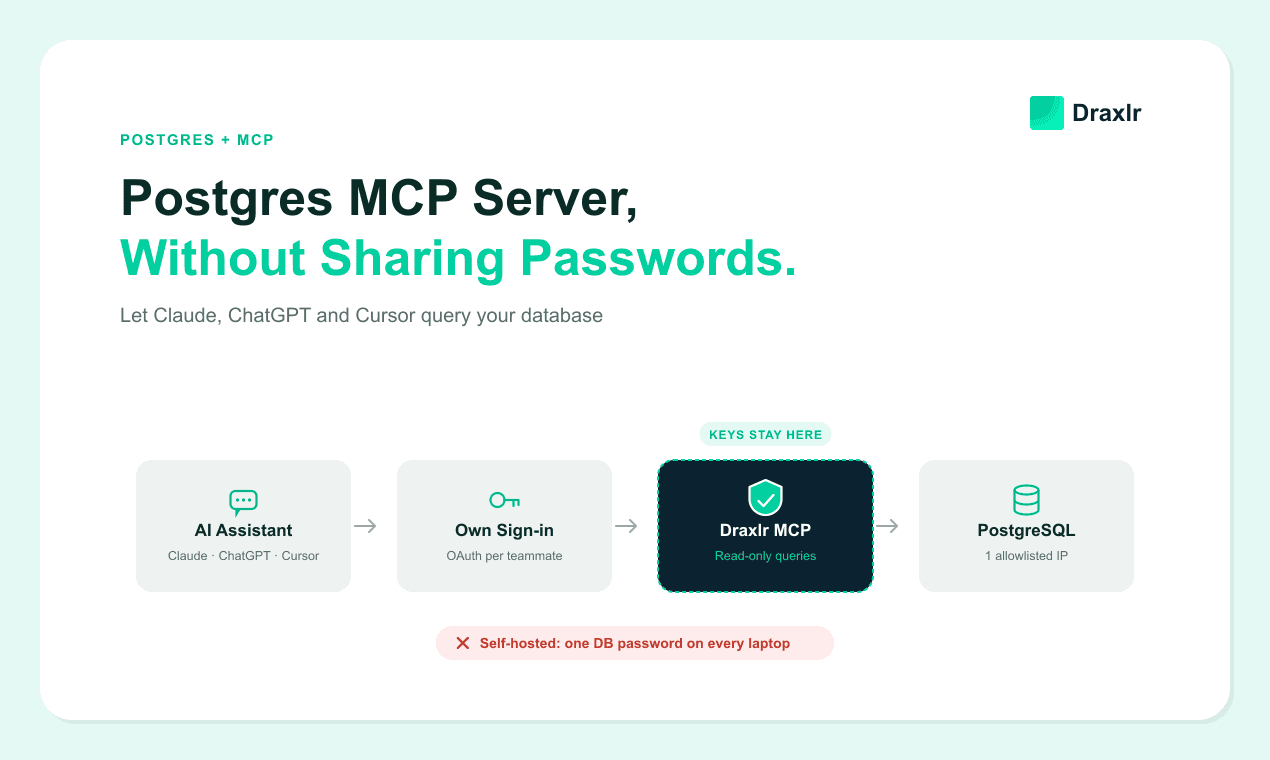
A Postgres MCP server is a small program that sits between an AI assistant and your PostgreSQL database. Using the Model Context Protocol (MCP), it gives Claude, ChatGPT or Cursor a set of tools, such as "list tables" and "run query". With those, the assistant can read your schema, write SQL and answer questions from live data. You can run an open-source server on your own machine, or connect a hosted one that you sign in to.
Both work for one person. The difference shows up the day a second person wants access. A self-hosted server on each laptop needs the database password on every one of them, and every laptop's IP on your firewall allowlist. A hosted server keeps the password in one place, and each person signs in with their own account.
This guide covers the main Postgres MCP servers in 2026, how to connect one to each assistant, and the credential risks that come with self-hosting for a team.
Key Takeaways
- A Postgres MCP server lets an AI assistant query PostgreSQL through tools. Self-hosted servers usually read a connection string from a config file on each person's machine. Hosted servers hold it once and use OAuth sign-in.
- The original reference server,
@modelcontextprotocol/server-postgres, was archived on May 29, 2025 and gets no security updates. npm still counted 443,545 downloads of it in the 30 days to October 10, 2026.- Running a local server for a team means sharing one password with everyone, allowlisting every laptop's IP, and rotating the password whenever someone leaves.
- ChatGPT can't launch a server on your laptop. It needs a public HTTPS endpoint or OpenAI's Secure MCP Tunnel.
- Whatever server you pick, connect it with a Postgres role that has only
SELECTgrants. Read-only checks inside MCP servers have been bypassed before.- With a hosted server like Draxlr's, you connect Postgres once, allowlist one IP and invite teammates. Each person signs in with their own account, and removing them from the team cuts off their assistant.
What is a Postgres MCP server?
A Postgres MCP server is an adapter that speaks the Model Context Protocol on one side and PostgreSQL on the other. Your AI assistant, called the MCP client, asks the server which tools it offers and then calls them: list schemas, describe a table, run a query. Behind each call, the server opens the database connection, runs the SQL and hands the rows back to the model.
Servers come in two shapes:
- Local (stdio). The assistant starts the server as a process on your computer. It reads your connection string from a config file or environment variable and connects to Postgres from your machine.
- Remote (HTTP). The server runs somewhere else, and the assistant reaches it over HTTPS, usually after an OAuth sign-in. The connection string lives on that server.
Where the connection string lives decides most of what follows. For the full path from a typed question to a query result, see how a natural-language SQL interface built on MCP works.
Postgres MCP Servers You Can Use in 2026
Three kinds of server are worth considering: a community server you run yourself, your database host's own server, or a hosted server from a BI tool. A fourth, the archived reference server, is one to avoid. The table compares the options Postgres users ask about most.
| Server | How it runs | Where the credentials live | What its maintainers say |
|---|---|---|---|
| Draxlr MCP | Hosted, with OAuth | Stored once in Draxlr. Each teammate signs in with their own account. | Accepts read queries only. Access levels per person. Works with any Postgres host. |
Reference server (@modelcontextprotocol/server-postgres) |
Local (stdio) | Connection string in each person's client config | Archived May 29, 2025. "No security updates or bug fixes will be provided." |
| Postgres MCP Pro (crystaldba) | Local (stdio), or self-hosted over SSE | DATABASE_URI in each person's client config, or on the server you run |
Restricted mode is read-only with execution-time limits. Unrestricted mode is for development. |
| Supabase MCP | Hosted, with OAuth | Your Supabase developer account | Use it internally. Connect to production "only when the task requires production evidence." |
| Neon MCP | Hosted with OAuth, or local with an API key | Your Neon account | "Intended for local development and IDE integrations only." |
Sources: Draxlr's MCP docs, the archived MCP servers repository, the Postgres MCP Pro README, Supabase's MCP guide and the Neon MCP server README, checked October 2026.
Two more open-source options support Postgres: Bytebase's DBHub and Google's MCP Toolbox for Databases. Both are servers you run yourself, so they follow the same credential pattern as Postgres MCP Pro.
The reference server needs a warning of its own. In August 2025, Datadog Security Labs showed that a COMMIT statement could end its read-only transaction early, after which writes ran normally. Datadog noted that version 0.6.2, the last one published, "remains unpatched at NPM and Docker Hub" (Datadog Security Labs, 2025).
Despite that, people keep downloading it. We pulled the numbers from npm's public downloads API: 443,545 downloads between September 11 and October 10, 2026 (npm downloads API). If a tutorial tells you to install it, pick another server.
Supabase's and Neon's servers are good tools for building on those platforms. Draxlr, which publishes this guide, is a listed partner of both Supabase and Neon.
Connecting a Self-Hosted Server to Claude, Cursor and ChatGPT
Claude Desktop, Claude Code and Cursor can all start a local Postgres MCP server from a JSON config that includes your connection string. ChatGPT can't start local servers, so self-hosting for ChatGPT means exposing the server through a public HTTPS endpoint or a tunnel.
Here is a typical config for Postgres MCP Pro, adapted from its README:
{
  "mcpServers": {
    "postgres": {
      "command": "uvx",
      "args": ["postgres-mcp", "--access-mode=restricted"],
      "env": {
        "DATABASE_URI": "postgresql://analyst:S3cretPass@db.example.com:5432/app"
      }
    }
  }
}
Where that block goes depends on the assistant:
- Claude Desktop: add it to
claude_desktop_config.jsonand restart the app. - Claude Code: run
claude mcp addwith the same command and an--envflag, or add the block to a project's.mcp.json. - Cursor: put it in
~/.cursor/mcp.jsonfor all projects, or.cursor/mcp.jsonfor one project. Cursor supports stdio, SSE and Streamable HTTP servers (Cursor docs). - ChatGPT: the server must be reachable "through a public HTTPS endpoint or Secure MCP Tunnel" (OpenAI). A process on your laptop can't be added directly, and on team workspaces an admin may need to allow custom MCP servers first.
Look at the DATABASE_URI line. That's your database password, in plain text, in a file on your laptop. For one developer on a local database, that's fine. For a team on production, it's where the risks start.
What are the risks of giving an AI assistant your database credentials?
A local server doesn't hand your password to the model, which only calls tools. Coding agents are the exception to watch: Claude Code and Cursor can read files in your project, so a connection string in .mcp.json or .env is within reach of an agent that has been fed malicious instructions. Most of the exposure, though, comes from how many copies of the password exist and how hard they are to take back.
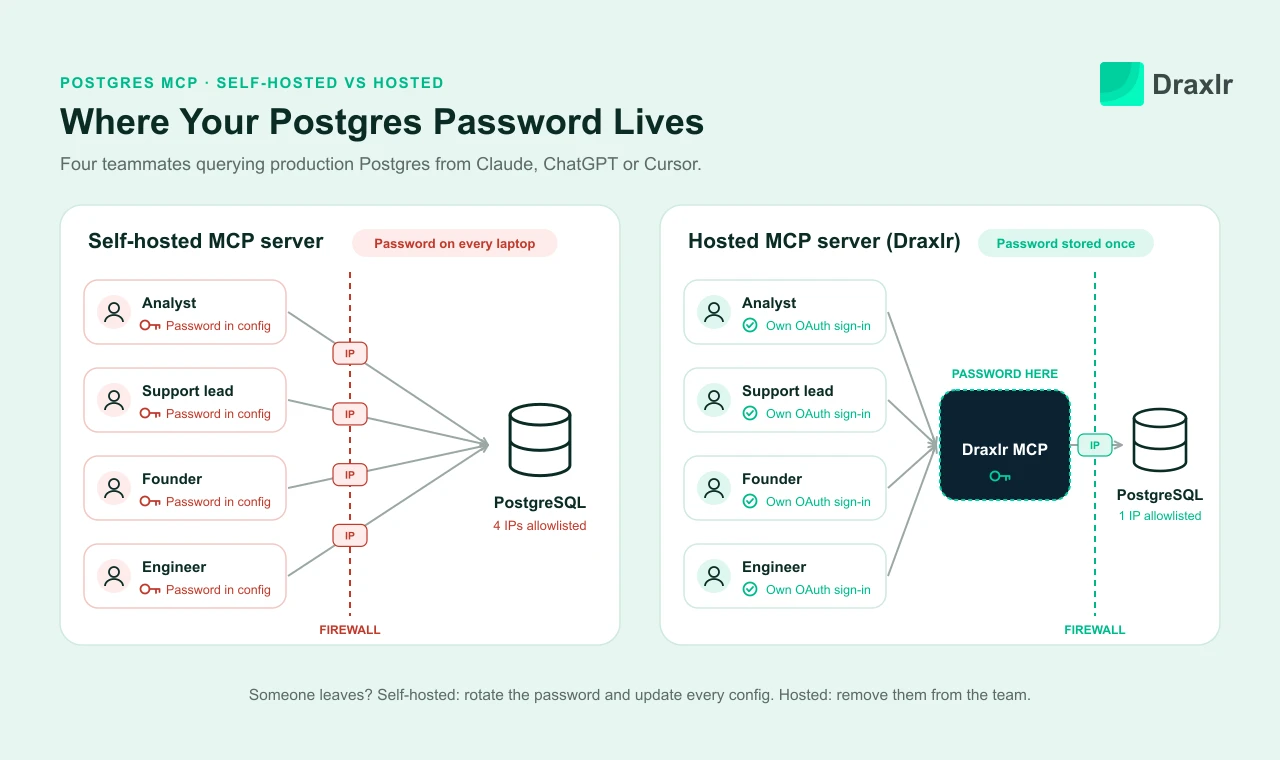
1. Every teammate needs a copy of the password
A local server connects from the machine it runs on. So every person who wants to ask Claude about production data needs the connection string in their own config. Picture a team of eight using both Claude Desktop and Cursor: that's 16 config files holding the same password, plus every Slack message or shared doc it traveled through.
The simplest setup is one shared database user, and Postgres then sees one user for everybody. pg_stat_activity shows that user name and a client IP. Laptop IPs change, so you can't reliably tie a slow full-table scan to your analyst or to someone's runaway agent loop. The alternative is one Postgres role per person, with its own grants, created and cleaned up every time someone joins or leaves.
2. The password sits in a plain-text config file
MCP clients read secrets from JSON files in predictable places. In April 2025, Trail of Bits found that Claude Desktop's claude_desktop_config.json was world-readable on macOS, so "any process or user on the system" could read it (Trail of Bits, 2025). That research also found Cursor and Windsurf storing chat logs, which can include pasted credentials, with world-readable permissions.
Those findings are from 2025. When we checked a current Claude Desktop install on macOS 26 in October 2026, the file was owner-only (-rw-------), so that specific hole looks closed. The password is still plain text to anything running under your account, including coding agents.
Project configs add a second path. Claude Code's docs say to "Check .mcp.json into version control so everyone on your team gets the same MCP tools" (Claude Code docs). That's sensible for tool settings. Paste a connection string into that file, though, and it lands in your git history. Writing ${DATABASE_URI} there keeps the secret out, but only if every teammate remembers to do it.
3. Every laptop's IP has to be allowlisted
Production Postgres shouldn't accept connections from the whole internet. On AWS RDS you control that with a security group, and Supabase and Neon offer IP allow lists. Because a local MCP server connects from each person's laptop, each laptop's public IP has to be on that list.
Laptop IPs move. Home connections get new addresses, people work from cafés and airports, and a new hire's first question waits on a firewall change. Under pressure, teams tend to pick one of three answers: a VPN or bastion host for everyone, a wide IP range, or 0.0.0.0/0. Only the first is safe, and it's one more piece of infrastructure to run.
4. Offboarding means rotating the password for everyone
When someone leaves, their laptop still has the connection string, and so does any backup of it. Removing their IP from the allowlist helps, but the password keeps working from every other allowlisted address. The safe move is to rotate it.
With a shared user, rotating means updating the config of every person who stays, in every assistant they use. Because that costs everyone time, it's the step most likely to slip.
5. Everyone sees every table
Anyone connected as a shared database user can read whatever that user can read. If it has access to users, payments and salaries, so does every assistant connected with it, and your sales lead asking about pipeline gets the same reach as your CTO. Postgres can narrow this with grants and row-level security, but both work per database role, which brings you back to one role per person.
Broad access also makes prompt injection worse. Supabase's MCP guide calls it "the primary attack vector unique to LLMs" (Supabase): text stored in your data tricks the model into running queries nobody asked for.
6. "Read-only" depends on server code you don't maintain
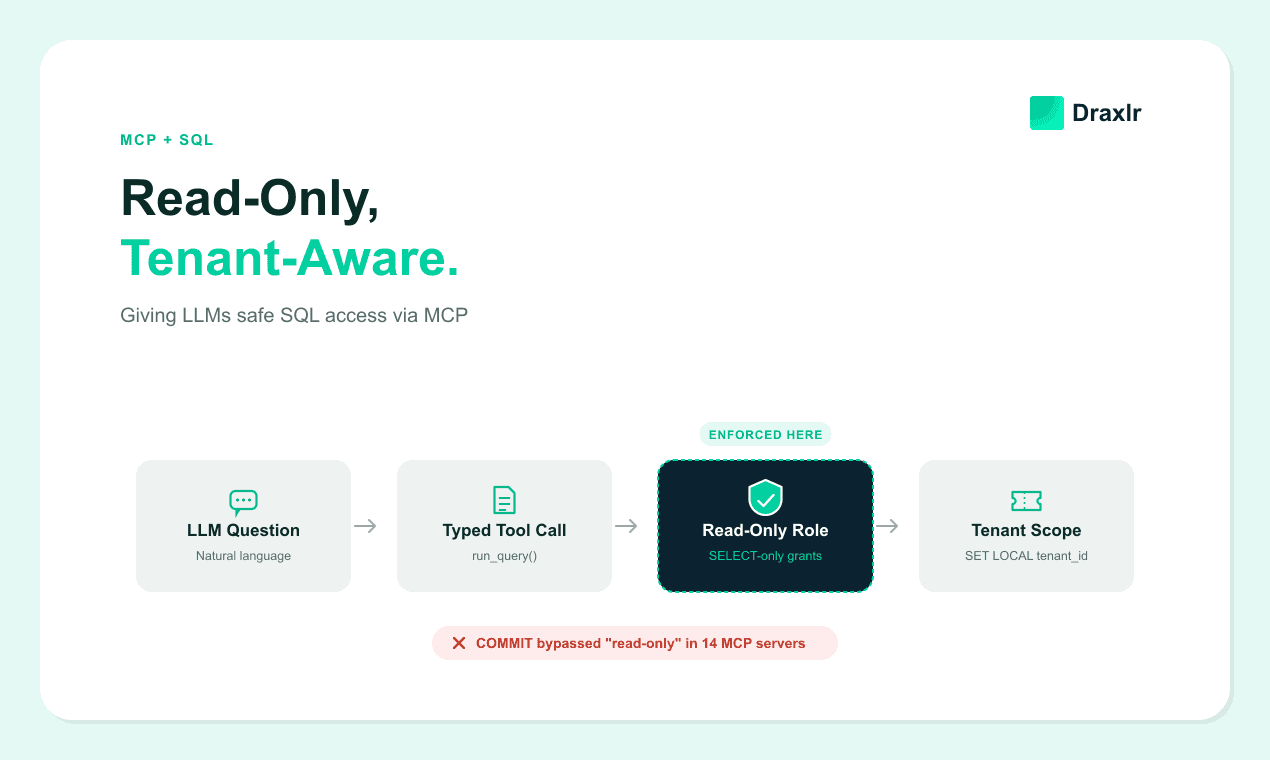
Several servers enforce read-only mode in their own code. The reference server relied on a read-only transaction alone, and a COMMIT could end it. That bug shipped in a server the MCP project itself published. Postgres MCP Pro's restricted mode adds SQL parsing on top of a read-only transaction, which is stronger. Both are still checks in code, and code can have bugs.
Durable protection comes from the database itself. Whichever server you run, self-hosted or hosted, connect it with a role that can only read:
CREATE ROLE mcp_reader LOGIN PASSWORD 'long-random-password';
GRANT CONNECT ON DATABASE app TO mcp_reader;
GRANT USAGE ON SCHEMA public TO mcp_reader;
GRANT SELECT ON orders, customers, products TO mcp_reader;
ALTER ROLE mcp_reader SET statement_timeout = '30s';
ALTER ROLE mcp_reader SET default_transaction_read_only = on;
Listing tables keeps salaries and other sensitive tables out of reach. If you'd rather grant everything, use GRANT SELECT ON ALL TABLES IN SCHEMA public, plus ALTER DEFAULT PRIVILEGES FOR ROLE <your_migration_role> so new tables are covered. On Postgres 14 and earlier, every role can also create tables in public by default, so revoke that too.
We tested this role on a throwaway PostgreSQL 18.3 database in October 2026. A plain INSERT failed with "cannot execute INSERT in a read-only transaction".
Then we did what a bypass does: SET default_transaction_read_only = off, and separately BEGIN READ WRITE. Postgres accepted both without complaint, but the INSERT still failed with "permission denied for table orders". DELETE, DROP TABLE, CREATE TABLE and a SELECT on an ungranted table all failed the same way. Transaction modes can be flipped by the session; grants can't.
For the other layers, such as statement parsing and tenant scoping, see how to enforce read-only, tenant-aware access in an MCP SQL server.
What about running one shared server yourself?
You can run a single remote instance of Postgres MCP Pro or DBHub for the whole team. That fixes the first and third problems: the password lives on one server, and only that server's IP goes on the allowlist. Offboarding gets easier too, since nobody else holds the password, but you still need a way to cut one person off. It's also the only self-hosted route into ChatGPT, through a public HTTPS endpoint or OpenAI's Secure MCP Tunnel.
The work moves to you. Check whether your server has any authentication at all; if it doesn't, anyone who can reach the URL can query your database. You also need per-person sign-in, a way to decide what each person may query, and someone to keep the server patched. That's the part a hosted server does for you.
How does a hosted MCP server fix the credential problem?
A hosted MCP server moves the connection string off everyone's laptop and onto one server. You connect Postgres to it once. Teammates point their assistant at the server's URL and sign in with their own account through OAuth. The server checks what each person may do and runs every query from its own fixed IP.
Here's how that maps to the risks above:
- One copy of the password, stored on the server.
- No secrets in client configs. The config holds only a URL, and the client manages the OAuth token. Claude Code, for example, says its tokens "are stored securely and refreshed automatically" (Claude Code docs).
- One IP to allowlist, the server's, no matter who is asking or where they are.
- Offboarding is one step. Remove the person from the team and their assistant loses access. Draxlr, for example, checks on every MCP request that the person is still an active member. Nobody else's setup changes.
- Different access for different people. Access levels decide what each person can do, and features like row-level security can limit which rows someone sees.
- Two layers of read-only. The server accepts only read queries, and the
SELECT-only role you connect it with enforces the same rule inside Postgres.
There are trade-offs. The vendor now stores your connection string, so check how it's protected. Draxlr, for example, encrypts database credentials with AES and uses TLS in transit (Draxlr security policy), and a SELECT-only role limits the damage if a credential ever leaks. Query results also pass through the hosted server on their way to your assistant.
Two things don't change. In both setups, the rows still go to the AI model provider, because that's how the assistant reads them. And from Postgres's side, every query still arrives as one database user, the hosted server's.
Self-Hosted vs. Hosted Postgres MCP: Side by Side
For a team querying a production database, the two models compare like this.
| Question | Local server on each laptop | Hosted server (Draxlr) |
|---|---|---|
| Where does the database password live? | In a config file on every teammate's machine | Once, encrypted in Draxlr |
| What goes on the firewall allowlist? | Every teammate's IP, or a VPN for everyone | One IP: 54.205.255.226 |
| How does a new teammate get access? | Receive the password, edit a config file, wait for an allowlist change | Accept an invite, add the URL, sign in |
| What happens when someone leaves? | Rotate the password and update everyone's config | Remove them from the team |
| Can people see different data? | Only with a Postgres role per person | Dashboard members see only assigned dashboards. On Power, RLS limits each person to their rows. |
| Does it work in ChatGPT? | Only through a public HTTPS endpoint or Secure MCP Tunnel | Yes, with the same URL as Claude and Cursor |
| Who maintains the server? | You, or an open-source maintainer | Draxlr |
Setting Up Postgres With Draxlr's MCP Server
Draxlr's MCP server is hosted at https://api.draxlr.com/mcp. It works with Claude, ChatGPT, Cursor, VS Code and Perplexity. It connects to Postgres on AWS RDS, Supabase, Neon or your own servers, and over SSH for databases in a private network. Setup takes four steps.
- Connect Postgres once. In Draxlr, add your database using a
SELECT-only role like the one above. The role's grants decide which tables anyone can query through Draxlr. If the database restricts incoming connections, allowlist Draxlr's IP,54.205.255.226. That's the only firewall change you make. - Invite your team. From Organization → Team, invite each person and choose an access level. Admin, Full and Read decide what someone can do; Dashboard limits them to the dashboards you assign. On the Power plan, RLS limits which rows each person sees.
- Each person adds the server. In Claude, ChatGPT or Cursor, add a custom connector or MCP server with the URL
https://api.draxlr.com/mcp. - Each person signs in. The assistant opens a Draxlr sign-in. After that, it can list databases, read the schema and run queries with that person's access.
Queries run read-only against your database. Draxlr accepts only read statements, and the SELECT-only role from step 1 enforces the same rule inside Postgres. Saving a query or adding it to a dashboard changes Draxlr, never your data, and Read members can't do even that. The access levels guide lists exactly what each level allows.
In Cursor, the whole config is a URL:
{
  "mcpServers": {
    "draxlr": {
      "url": "https://api.draxlr.com/mcp"
    }
  }
}
That file has no password to leak, commit or rotate. For step-by-step screens, follow the guides to connect Claude to your SQL database or connect ChatGPT to your SQL database.
MCP is on every Draxlr plan. Lite ($25/month) covers one user and 50 MCP requests a month. Premium ($75/month) allows 10 users with no request limit, and Power ($250/month) allows 30 users and adds row-level security. Beyond queries, the assistant can save queries, add them to dashboards and export results; see everything Draxlr's MCP server can do.
When should you still self-host a Postgres MCP server?
Self-host when one person is working against a database only they use. A local server pointed at a Postgres on the developer's own machine has no password to share and nothing to allowlist. Query results still go to the model provider, but no third-party server sits in between.
Good fits for a self-hosted server:
- A developer exploring a local database while building features, where an unrestricted mode can even help with migrations.
- Performance work. Postgres MCP Pro adds index tuning,
EXPLAINplans and database health checks. - Policies that don't allow a third-party service to hold database credentials. Remember that the assistant's model still runs in the cloud unless you use a local model.
If you self-host against anything shared, use the SELECT-only role above and point it at a read replica when you can. Keep the connection string in an environment variable set outside the project folder, never in a file you commit or an agent can open.
Frequently Asked Questions
What is the best Postgres MCP server?
For a team querying production, a hosted server such as Draxlr's is the safer choice: it keeps the password in one place and gives each person their own sign-in and access level. For one developer on a local database, Postgres MCP Pro is a maintained open-source option with a restricted, read-only mode.
Is the official Postgres MCP server still maintained?
No. The original reference server, @modelcontextprotocol/server-postgres, was archived on May 29, 2025 and receives no security updates or bug fixes. Datadog Security Labs showed that its read-only mode could be bypassed with a COMMIT statement, and the version on npm was never patched.
Can ChatGPT connect to a local Postgres MCP server?
Not directly. ChatGPT reaches MCP servers through a public HTTPS endpoint or OpenAI's Secure MCP Tunnel, so it can't launch a server on your laptop. A hosted server such as Draxlr's works in ChatGPT with the same URL you use in Claude and Cursor.
Does Claude see my Postgres password?
Not through MCP. The model only calls the server's tools, and the server holds the database connection. Coding agents such as Claude Code and Cursor can read files in your project, though, so keep connection strings out of .mcp.json and .env files they can open. With a hosted server and OAuth sign-in, no client config contains the password.
How do I give my team access to Postgres through Claude without sharing the password?
Use a hosted MCP server. Connect Postgres to it once with a SELECT-only role, allowlist its IP, then invite teammates. Each person adds the server URL in Claude, ChatGPT or Cursor and signs in with their own account. Removing someone from the team ends their access without changing anyone else's setup.
Do I need to allowlist IP addresses for a Postgres MCP server?
Yes, if your database restricts incoming connections. A local server connects from each person's laptop, so every laptop's IP needs an allowlist entry. A hosted server connects from its own address, so you allowlist one IP. For Draxlr, that IP is 54.205.255.226.
Choose the Setup That Fits Who Will Use It
A Postgres MCP server is a good way to let Claude, ChatGPT and Cursor query your database. The real decision is where the password lives. On one developer's laptop, a local server is simple and free. Across a team on production, it turns into a password copied to every laptop, an allowlist that keeps growing, and an offboarding step that keeps slipping.
If more than one person needs answers from production Postgres, create a SELECT-only role, connect it once to a hosted server and invite people. Try Draxlr's AI SQL tool for Postgres and connect Claude, ChatGPT or Cursor in a few minutes.
About the author

Vivek is a coder and the founder of Draxlr who cares deeply about building good products. He works at the intersection of AI, SQL, dashboards, and embedded analytics, with a strong focus on making complex data workflows feel simple, useful, and fast for real teams.
If you have questions about anything in this guide, or want to compare options for your specific stack, you can email Vivek at vivek@draxlr.com, try Draxlr free, or reach out directly through the Draxlr team.