How to Chat With Your SQL Data Using Claude (Step-by-Step Guide)
Connect Claude to your SQL database with Draxlr's MCP server, then ask questions in plain English. A 4-step guide with example prompts, safety tips, and setup.
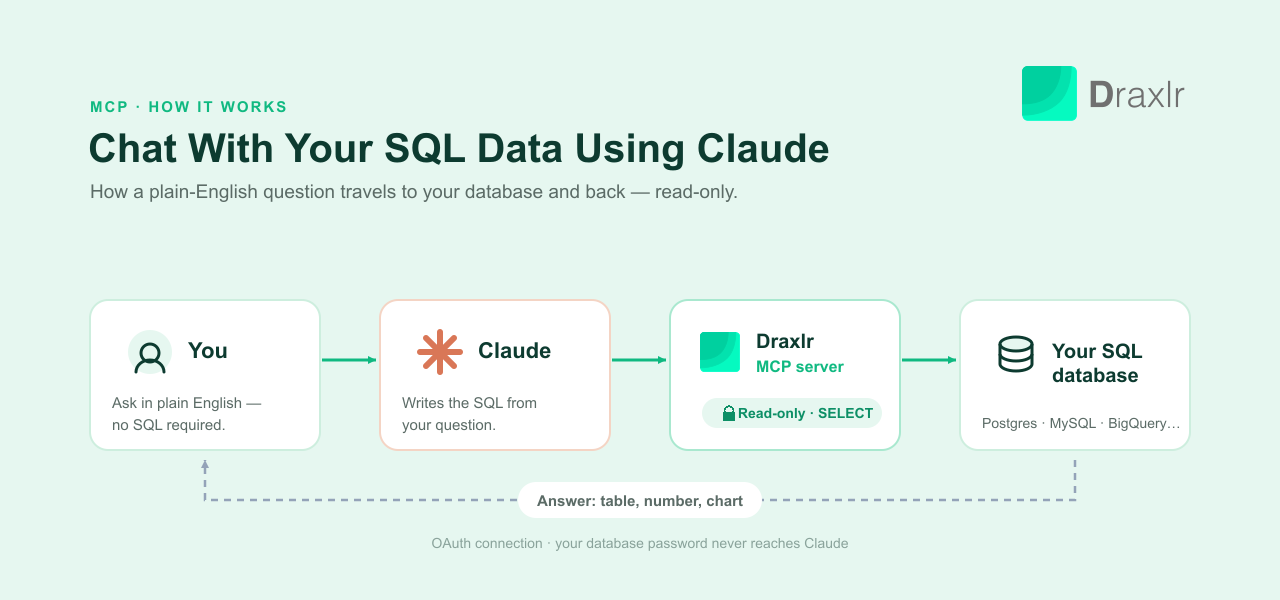
To chat with your SQL data using Claude, connect Claude to your database through an MCP (Model Context Protocol) server, then ask your question in natural language — plain English, no query syntax. Claude writes the SQL, runs it against your live data, and hands back a table or a number — no query language, no BI tool, no waiting on the one person who knows SQL. With Draxlr's MCP server, the whole setup is a one-time OAuth connection you can finish in about two minutes.
This guide walks through exactly how to do it: what you need, how to connect Claude to your database step by step, the first prompts worth trying, and how to keep every answer safe and accurate.
Key Takeaways
- You connect Claude to your SQL database once through an MCP server; after that you ask questions in plain English and Claude generates and runs the SQL for you.
- With Draxlr, the connection is a single OAuth handshake — you add
https://api.draxlr.com/mcpas a custom connector in Claude, sign in, and you're done. Your database password never touches Claude.- The connection is read-only by design: only
SELECTqueries run, and write statements are rejected at the server, so Claude can never change or delete your data.- Claude can go beyond one-off answers — with Draxlr it can save a question as a reusable query, drop it onto a dashboard, and export results to CSV, Excel, or PDF, all from the same chat.
- Because Claude connects through the MCP server, you can share the same natural-language access with teammates — and even customers — without handing out database credentials, and row-level security limits each customer to only their own rows.
- MCP has scaled from about 100,000 monthly SDK downloads at launch to over 97 million within roughly a year, with Claude, ChatGPT, Gemini, and Copilot all supporting it (Model Context Protocol Blog, December 2025).
What do you need to connect Claude to a SQL database?
To connect Claude to a SQL database, you need three things: a Claude plan that supports custom connectors, a database reachable through an MCP server, and a couple of minutes to authorize the connection. Claude never stores your database credentials — it talks to the MCP server, and the server holds the connection to your database. None of this requires a data engineer.
Here's what that looks like with Draxlr:
- A Claude account on a plan that supports custom connectors (Claude Desktop or the web app with connectors enabled).
- Your database connected to Draxlr. It works with PostgreSQL, MySQL, SQL Server, MariaDB, ClickHouse, Snowflake, BigQuery, Redshift, Databricks, and more. If you haven't connected one yet, you add it once with its host, port, name, and a read-only user — see Draxlr's database credentials guide for the exact fields per provider.
- Two minutes to authorize the connection.
That's it. You never paste a connection string or a password into Claude — the point of going through an MCP server is that Claude talks to Draxlr, which talks to your database.
How to Chat With Your SQL Data Using Claude in 4 Steps
Here's the full setup, start to finish. If you'd rather watch it than read it, the video below shows the same flow end to end.
Step 1: Connect your database to Draxlr
Sign in to Draxlr and add your SQL database if you haven't already. You'll need the host, port, database name, and a database user — ideally a read-only user, which keeps the whole pipeline safe by default. It encrypts these credentials and holds the connection so nothing downstream (including Claude) ever sees them.
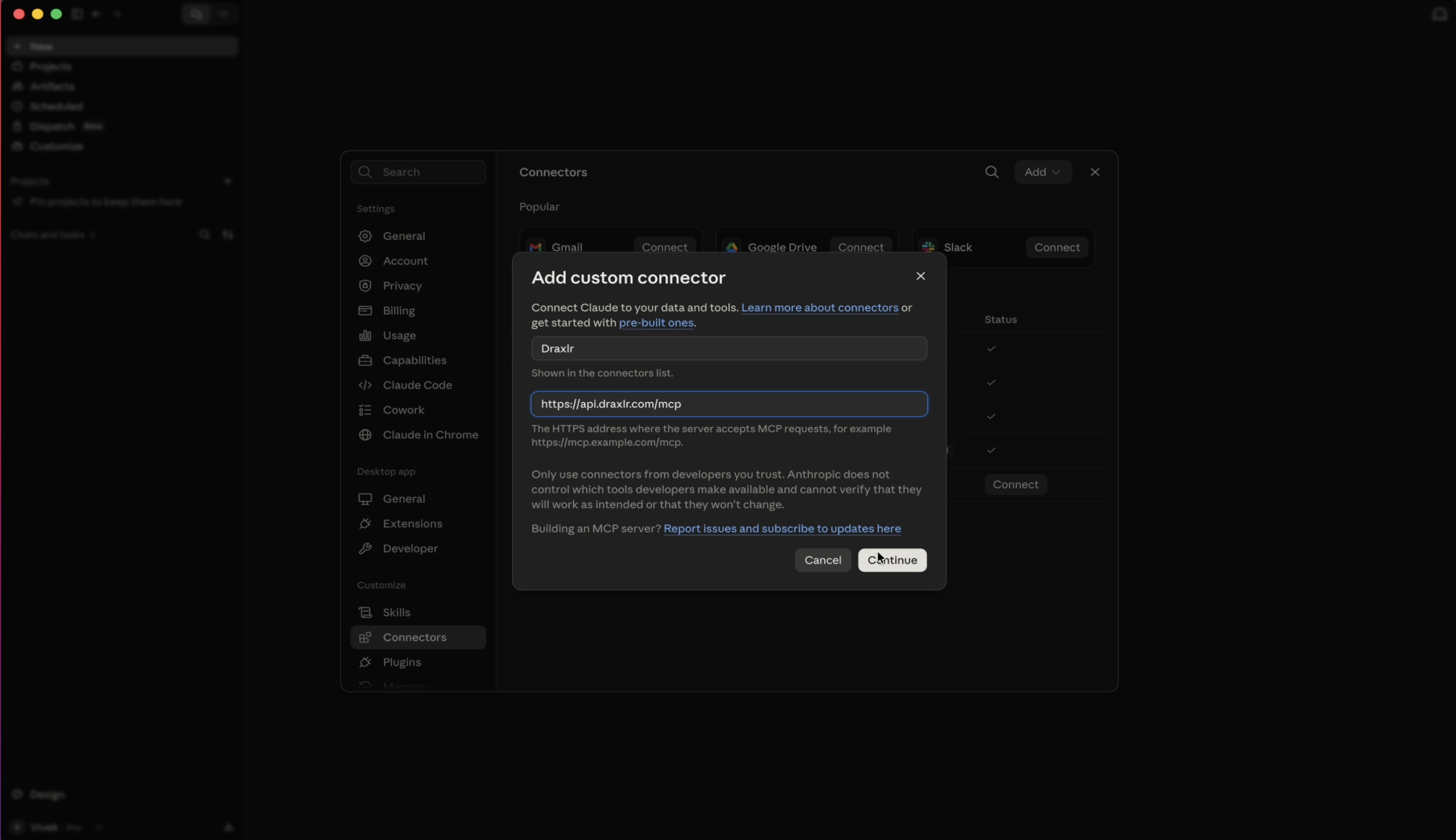
Step 2: Add Draxlr as a custom connector in Claude
Open Claude's connector settings and choose Add custom connector. Enter the Draxlr MCP server URL:
https://api.draxlr.com/mcp
Click Connect. There's nothing to copy or paste beyond that URL — Draxlr uses OAuth, so the token exchange happens automatically.
Draxlr is also listed in the Claude Directory, so you can add it from its listing there instead of entering the URL by hand. Either way, you sign in to Draxlr in the next step.
Step 3: Authorize with your Draxlr account
Claude opens a Draxlr sign-in window. Log in, approve the access request, and the handshake completes. Claude now has a permissioned door into your databases through that connection — and nothing else. It never receives your database password or connection string.
Step 4: Ask your first question in natural language
Back in the chat, ask a natural language question about your data — plain English, no SQL required:
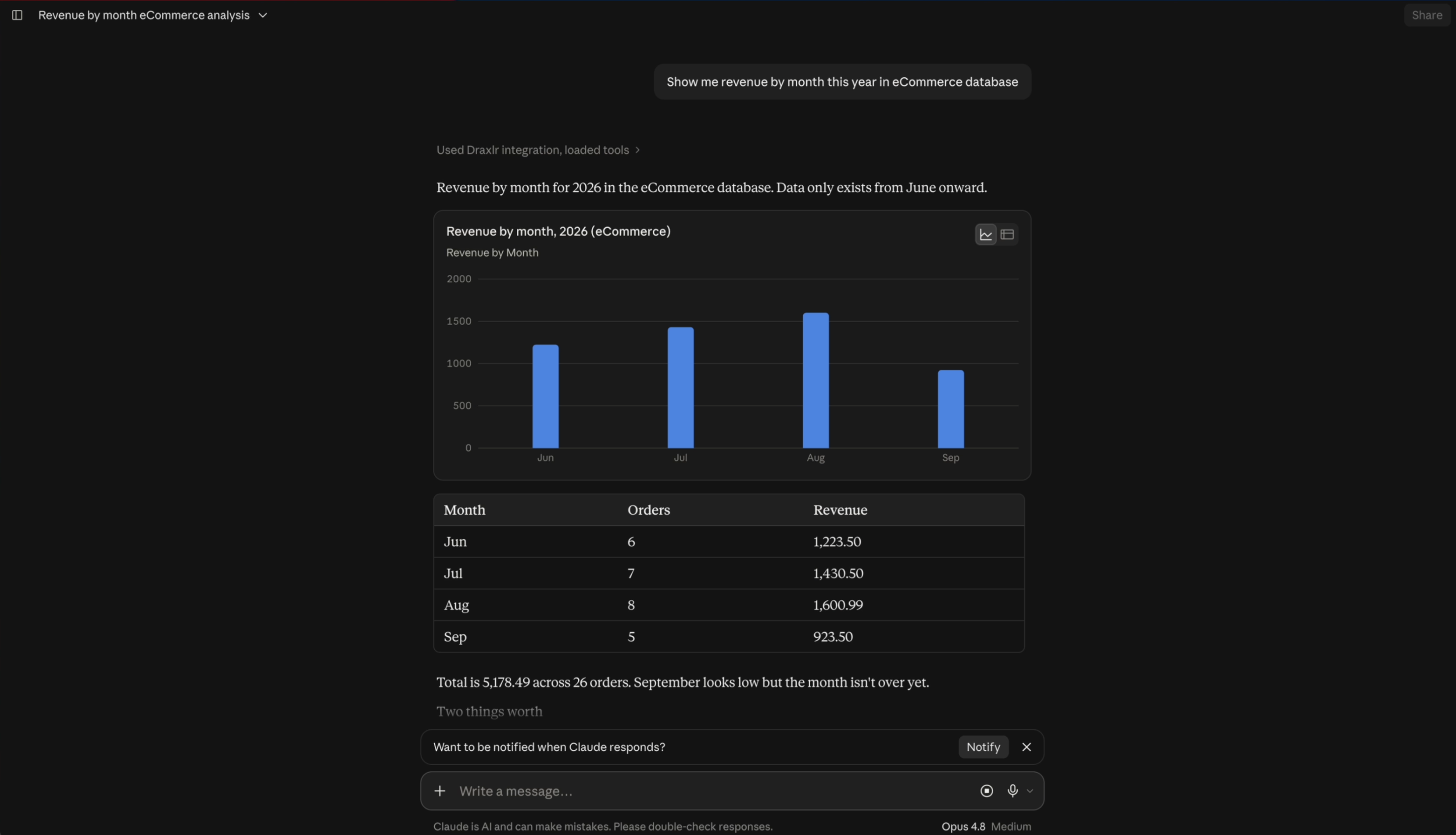
"Show me revenue by month this year in eCommerce database"
Claude calls Draxlr, which reads your schema, writes the correct SQL, runs it read-only against your live database, and returns a table. Ask a follow-up and it drills in from there. You are now chatting with your SQL data using Claude.
For the engineering-level detail on how a server like this is built, see the technical architecture behind MCP SQL integrations.
What can Claude do with your database once it is connected?
Once Claude is connected to your database through an MCP server, it can do more than answer a single question. Depending on what the server exposes, Claude can write and run read-only SQL, save a question as a reusable query, add it to a dashboard, and export the results — all without leaving the conversation. Through Draxlr's MCP server, that full range is available from the chat:
| Ask Claude to… | What happens through Draxlr |
|---|---|
| Answer a question | Reads your schema, writes SQL, runs it read-only, returns a table or number. |
| Save a query | Stores the question as a named, reusable saved query anyone on your team can rerun. |
| Build a dashboard | Adds a saved query to a dashboard as a live widget you check every day. |
| Export results | Returns a CSV or Excel file for a query, or a PDF/Excel of a whole dashboard. |
| Find existing work | Searches your saved queries and dashboards by name so you don't rebuild them. |
Every one of these returns a shareable Draxlr link, so an answer that started in a chat can be handed to a teammate who never opened Claude at all. This is the layer Draxlr's AI SQL tool is built around.
Example Prompts to Try First
The fastest way to feel the value is to ask the questions you'd normally file a ticket for. A few to start with:
- "What were our top 10 products by revenue last quarter?"
- "Which subscription plan has the highest churn in the first 30 days?"
- "Show me signups per week for the last 3 months as a chart."
- "How many trial users converted to paid last month, by signup source?"
- "Which customers haven't logged in for 60+ days?"
Then push into what makes this more than a search box. Because Claude is talking to Draxlr, you can keep going in the same conversation:
- Save it for later: "Save that as a query called Weekly Signups." Claude stores it in Draxlr so the next person doesn't start from scratch.
- Put it on a dashboard: "Add the weekly signups query to my Growth dashboard." A one-off question becomes a standing report — no data team round trip.
- Export it: "Export those results to Excel." Claude hands back a CSV or
.xlsxfile. Whole dashboards can be exported to PDF the same way.
That compounding is the real payoff. This month's curiosity becomes next month's saved query, and a good question becomes a piece of reporting the whole team can reuse — see how to build a SQL dashboard with AI for where that leads.
How to Get Accurate Answers Every Time
AI-generated SQL is strong on straightforward questions and worth double-checking on anything that decides money moves. On BIRD-SQL, a standard text-to-SQL benchmark, the single best-performing model reached 0.824 execution accuracy under blind adjudicated review in a 2026 evaluation of 36 models (BIRD-SQL leaderboard; AIMultiple, 2026). Treat that as a ceiling for a curated benchmark, not a promise for your own schema.
Three habits keep answers trustworthy:
- Ask Claude to show the SQL. "Show me the query you ran." A five-second read catches a wrong join or an off-by-one date range before it reaches a deck.
- Name your metrics precisely. "Active users" means different things to different teams — say "users with a login in the last 30 days" and you'll get the number you meant.
- Sanity-check against a number you trust before repeating a result externally. Treat the first answer like a junior analyst's first pass: good to work from, worth a second look.
Well-described tables help too — for the mechanics of why, see schema-aware prompting for text-to-SQL.
Is It Safe to Connect Claude to Your Database?
Yes — when the connection is built correctly. Safety here is a permissions question, not a question of whether the model behaves: the connection should be read-only so only SELECT queries can run, and your database credentials should stay with the MCP server and never reach the model. A well-built server enforces this at the connection level, not with a prompt asking the AI to be careful. Draxlr's connection is built that way on purpose:
- Read-only by design. Only
SELECTqueries run through the Draxlr MCP server; write, update, and delete statements are rejected at the server, not by a prompt asking the model to be careful. Claude cannot change or delete your data. - Your credentials never reach Claude. The model talks to Draxlr over OAuth; it holds the encrypted database connection. No password or connection string is ever exposed to the AI.
- Scoped and revocable. Access maps to what your Draxlr account already permits, and you can revoke the connector at any time.
This matters because unmanaged AI use is already a measurable risk. An Okta survey reported by Cybersecurity Dive found nearly two-thirds of U.S.-based employees use AI tools their employer hasn't approved, and 58% of executives report an AI-related security incident or close call in the past year (Cybersecurity Dive, 2026). Connecting through a read-only, credential-isolated server like Draxlr's is how you get the upside without becoming that statistic. For the enforcement mechanics behind "read-only," including a case where a popular open-source MCP server got it wrong, see how read-only access actually gets enforced.
How do you share database access with your team and customers?
Because Claude reaches your database through an MCP server rather than a direct connection, you can give other people the same natural-language access without ever handing out database credentials. Each person connects with their own login, and the server decides what they are allowed to see. That turns "chat with your SQL data" from a solo tool into something a whole team — or even your customers — can use safely.
With Draxlr, this works two ways:
- For your team. Each teammate adds the same Draxlr MCP connector and authorizes with their own Draxlr account. Access maps to what that account already permits — nobody shares a connector, a password, or a connection string, and you can revoke any one person without touching the others.
- For your customers. Row-level security (RLS) lets external users query the same database through Claude while seeing only their own rows. You define a permission — which tables are visible and a row filter such as
tenant_id = {customer}— attach it to a group, and set each member's attribute values. The scoping is automatic and applies everywhere: queries, dashboards, drill-downs, and exports. A customer can ask a question in plain English and still cannot retrieve another customer's data.
This is what makes an MCP server different from just giving someone a database login: one connection, many people, each scoped to exactly what they should see. See Draxlr's row-level security guide for the exact setup, or how embedded analytics works for the customer-facing side.
What if the connector doesn't work?
Most setup issues resolve in under a minute once you know where to look:
- "Add custom connector" isn't in Claude's settings. Custom connectors require a Claude plan that supports them (Claude Desktop or web app, connectors enabled). If the option is missing, check your plan tier before assuming the URL is wrong.
- The OAuth window closes without connecting. Make sure you're signing in with the same account your database is connected to — a mismatch between your Claude session and that login is the most common cause. Close the window, reopen the connector settings, and try again.
- Claude says it can't find a table or column. This usually means the schema hasn't finished syncing, or the table lives in a different database than the one connected. Ask Claude to list the tables it can see, and compare that against the schema view in the app.
- A query times out on a very large table. Row caps and timeouts apply server-side to keep exploratory queries fast — ask for a narrower date range or a
LIMIT, the same way you would with a slow query in any SQL client. - You need more than one person connected. Each teammate authorizes their own connection with their own login, so access always maps to what that person's account already permits — nobody has to share a connector or a credential.
If none of that resolves it, Draxlr's MCP server documentation covers the connector setup in more detail.
Chat vs. Dashboard: When to Use Each
Chatting with your data and building a dashboard aren't competing choices — most teams use both, and Draxlr lets Claude create both. Chat wins for one-off, exploratory questions where you don't yet know what you're looking for. A dashboard wins for the handful of numbers everyone needs to see the same way, every day.
| Situation | Chat with Claude | Dashboard |
|---|---|---|
| One-off question, not sure of the exact metric yet | Strong fit — rephrase and drill in conversationally | Weak fit — you'd need someone to build the view first |
| Same 5 numbers checked every Monday by 10 people | Weak fit — everyone re-asks and phrasing drifts | Strong fit — one definition, shared by everyone |
| Number headed for a board deck or customer report | Use as a starting point, then verify | Strong fit — auditable, consistent definition |
| Customers need to see their own usage inside your product | Not applicable — this is an internal tool for your team | Strong fit — this is embedded analytics territory |
The best part: with Draxlr you don't have to choose in advance. Ask Claude a question, and when the answer turns out to matter every week, tell it to save the query and pin it to a dashboard — in the same conversation. If you're weighing options across the category first, our roundup of the best AI SQL tools compares pricing and feature depth.
Claude or ChatGPT: Which Should You Use?
Use the one your team already has open. Draxlr's MCP server works the same with both: the same URL, the same read-only tools, and the same RLS. The differences are on the client side.
| Claude | ChatGPT | |
|---|---|---|
| How you add Draxlr | Add custom connector, or install from the Claude Directory | Developer mode → create an app in Plugins with the MCP URL |
| Turning it on per chat | Connector is available once enabled | + menu → Developer mode → tick Draxlr |
| Plans | Plans with custom connectors | Plus, Pro, Business, Enterprise, Education |
| Read-only queries and RLS | Yes, enforced by Draxlr | Yes, enforced by Draxlr |
Using ChatGPT? Follow how to chat with your SQL data using ChatGPT for the Developer mode setup and per-customer access.
Frequently Asked Questions
How do I connect Claude to my SQL database?
Connect your database to Draxlr, then in Claude add a custom connector pointing to https://api.draxlr.com/mcp and sign in to Draxlr when prompted. Claude can then read your schema, write SQL, and run read-only queries against your live data in plain English. The whole setup is a one-time OAuth connection.
Do I need to know SQL to chat with my data using Claude?
No. You type a question in natural language — plain English — and Claude generates and runs the SQL behind the scenes through Draxlr, then returns a table, a number, or a short summary. Knowing SQL only helps if you want to double-check the query it wrote.
Can Claude accidentally change or delete my data?
No. The Draxlr MCP connection is read-only — only SELECT queries run, and write, update, or delete statements are rejected at the server level. This doesn't depend on the model choosing to behave.
Does Claude see my database password?
No. Claude connects to Draxlr over OAuth, and Draxlr holds the encrypted database connection. Your password and connection string are never exposed to the AI model.
Can I share this access with my team or customers?
Yes. Each person adds the same Draxlr MCP connector and signs in with their own account, so nobody shares database credentials. For customers, row-level security scopes each user to only their own rows — they can query your database through Claude but can never see another customer's data.
Which databases can I use?
Draxlr connects to PostgreSQL, MySQL, SQL Server, MariaDB, ClickHouse, Snowflake, BigQuery, Redshift, Databricks, and more — any of them can be queried through Claude once connected.
How accurate are the answers?
On the BIRD-SQL benchmark, the single best-performing model reached about 82% execution accuracy under blind adjudicated review in a 2026 evaluation — a ceiling for a curated benchmark, not a guarantee for your own schema. Ask Claude to show its SQL, and manually check any number headed for a board deck or external report.
Getting Started: Connect Claude to Your SQL Data
You don't need a company-wide rollout to find out whether this is useful. Connect one database to Draxlr, add the connector in Claude, and let a few people ask real questions for a week — the questions they actually ask will tell you more about where the value is than any demo. Because the connection is read-only and your credentials never leave it, the risk of trying it is small.
The shift isn't the novelty of chatting with your SQL data instead of writing it by hand. It's that the two-day round trip through a data team is no longer the default for a question that takes ten seconds to type — and with Draxlr, the good questions don't disappear after you ask them. Ready to try it? Explore Draxlr's AI SQL tool and connect Claude to your data today.
About the author

Vivek is a coder and the founder of Draxlr who cares deeply about building good products. He works at the intersection of AI, SQL, dashboards, and embedded analytics, with a strong focus on making complex data workflows feel simple, useful, and fast for real teams.
If you have questions about anything in this guide, or want to compare options for your specific stack, you can email Vivek at vivek@draxlr.com, try Draxlr free, or reach out directly through the Draxlr team.