What Is Embedded Analytics? A Guide for SaaS Teams
Embedded analytics puts dashboards inside your product. See how it works, the 4 types, SaaS examples, and why 500 viewers can cost $250 or $6,455 a month.
Embedded analytics is reporting that lives inside your product. Your customers open dashboards, tables, metrics and AI answers about their own data without leaving your app or logging in to a separate BI tool. It's also a rising priority. In Dresner Advisory's 2024 Embedded BI Market Study, 73% of respondents rated embedded BI critical or very important, up from 61% the year before (Dresner Advisory, via insightsoftware, 2024). Dresner's 2025 study put its importance at a new all-time high (Dresner Advisory Services, 2025).
For a SaaS team, that one feature touches security, pricing and product design at once. This guide covers how embedded analytics works, the four types you can ship, examples by industry, what it costs as your customer count grows, and how to choose an embedded analytics tool.
Key Takeaways
- Embedded analytics puts reporting inside your product, behind your login and brand, scoped to each customer's own data.
- Isolation belongs on the server: row-level security applied from a signed, short-lived embed token.
- There are four types: scheduled reports, embedded dashboards, self-serve workspaces and plain-English questions. Most teams start with dashboards.
- The pricing model beats the entry price. With Metabase Pro's interactive embedding, 500 signed-in customers cost $6,455/month at list price. A flat plan costs the same at 5 viewers or 5,000.
- Results aren't automatic. In a small 2026 survey produced with ThoughtSpot, 57.2% of teams that shipped saw no measurable ROI yet.
What Is Embedded Analytics?
Gartner defines embedded analytics as "a digital workplace capability where data analysis occurs within a user's natural workflow, without the need to toggle to another application" (Gartner). For a SaaS product, that workflow is your app: a usage dashboard in an API platform, a sales summary in a store admin, an on-time delivery report in a logistics tool. Customers never leave the product, and every number is scoped to their account.
So what makes it "embedded" and not just a link to a BI tool? Four things. It uses your product's login, so there's no second account. It follows your permissions, so a viewer only sees what their account owns. It looks like your product, with no third-party logos. And it sits where the question comes up, not in a reporting tab nobody opens.
SaaS products add a fifth requirement. A general BI tool is built for one company analyzing its own data. A SaaS product serves hundreds or thousands of customers from the same database, and every one of them must see only their own rows. That multi-tenant requirement shapes nearly every decision in the rest of this guide.
How Is Embedded Analytics Different From Traditional BI?
Traditional BI tools like Tableau, Looker and Power BI were built for employees analyzing their own company's data. Even there, reach is limited: on average only 25% of employees actively use BI tools, with minimal growth over seven years (BARC and Eckerson Group, 2022). In the same survey of 214 data leaders, 38% named embedded BI as a main driver of wider use.
Embedded analytics changes the audience to customers, and that changes almost everything else.
| Traditional BI | Embedded analytics | |
|---|---|---|
| Who uses it | Employees, analysts, executives | Your customers |
| Whose data they see | The company's own data | Only their account's rows in a shared database |
| Where it lives | A separate app with its own login | Inside your product, behind your login |
| Access control | Employee roles and groups | Tenant boundaries, applied to every query |
| Branding | The BI vendor's | Yours (white-labeled) |
| Typical pricing | Per employee seat | Flat, per viewer, usage or capacity |
| What users must know | Data modeling, filters, sometimes SQL | Usually nothing beyond your product |
That's why "we already have a BI tool, let's embed it" often stalls. Internal BI is usually priced per seat, its permissions are designed around employee roles, and its interface assumes someone who analyzes data for a living. Your customers are none of those things. The best embedded analytics tools guide compares options built for this audience.
Is embedded analytics the same as product analytics?
No. Product analytics tools like Mixpanel and Amplitude show your team how customers use your product: funnels, cohorts, feature adoption. Embedded analytics shows your customers their own data inside the product: their orders, their usage, their results. Many SaaS companies run both, and they answer different questions for different people.
How Does Embedded Analytics Work?
Every embedded analytics setup has three stages: connect the data, build the reports, and deliver them into your product with each viewer's permissions attached. The first two look like any BI project. The third is where embedded analytics differs, because it's where the system decides which customer's rows a viewer may see.
1. Connect the data
The tool connects to the database your product already uses, usually PostgreSQL or MySQL, or a warehouse like BigQuery, Snowflake or Redshift. Use a read-only database user, and point it at a read replica once customer traffic grows, so heavy dashboards can't slow down your production app.
2. Build the reports
Your team builds dashboards from tables, metrics, pivots and charts. Depending on the tool, that's a drag-and-drop builder, a SQL editor, or an AI assistant that writes SQL from a plain-English question. The best first dashboards answer what customers already email your support team about.
3. Deliver them with the viewer's permissions
When a customer opens the page, your backend asks the analytics service for a signed, short-lived embed token for that customer. The token says who the viewer is and which rows they may see, for example account_id = 4821. The service applies that rule on the server when it runs the query. Changing a URL parameter or editing the page in the browser can't widen what comes back.
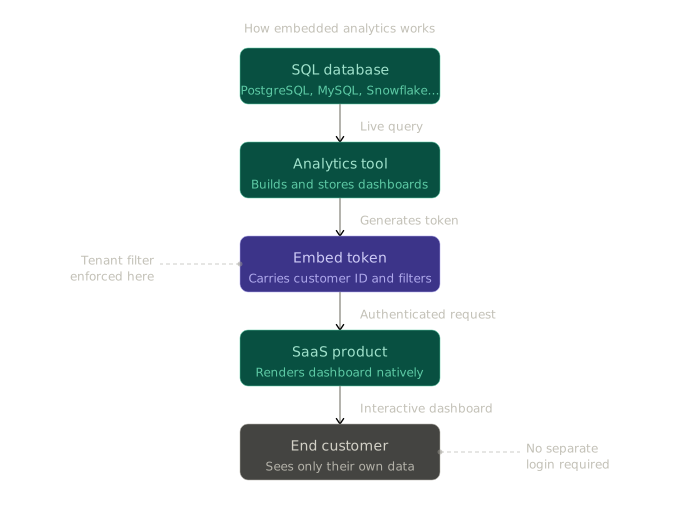
In Draxlr, that rule is row-level security. You define it once in an RLS group on the Power plan ($250/month), and your backend sends the group and the customer's attributes with each embed token. Each new customer is covered by the same rule.
Watch: How embedding works in Draxlr
What Are the Types of Embedded Analytics?
Embedded analytics comes in four types, set apart by how much freedom customers get: scheduled reports, embedded dashboards, self-serve workspaces and plain-English questions. Each step up answers more questions without a support ticket. Each step also makes tenant isolation harder, because your team writes fewer of the queries that run.
| Type | What customers can do | Work for your team | Fits when |
|---|---|---|---|
| Scheduled reports | Receive a PDF, CSV or email summary on a schedule | Low | Customers want a monthly recap, not exploration |
| Embedded dashboards | Filter, drill down and export dashboards you built | Low to medium | Most customers ask the same questions |
| Self-serve workspace | Build their own reports with a query builder or SQL, starting from your dashboards | Medium: the tenant boundary must hold for queries you didn't write | Questions vary a lot between accounts |
| Plain-English questions | Ask a question and get back a table, chart or number | Medium to high: AI-written SQL needs the same tenant boundary | Customers aren't analysts and their questions are hard to predict |
Which one should you start with? For most SaaS teams, embedded dashboards. They cover the questions most customers share, and your team wrote every query behind them, so there's less to secure. A self-serve workspace earns its place later, once tickets pile up from customers who want a cut of the data no dashboard shows. Our comparison of single-dashboard and full app embedding walks through that decision.
In Draxlr, single-dashboard embedding starts on the Premium plan ($75/month) with filters, drill-downs and exports. Full App Embedding gives each customer their own workspace with a query builder, SQL editor and AI assistant, and it's on the Power plan ($250/month) and above.
Why Do SaaS Teams Add Embedded Analytics?
SaaS teams add embedded analytics to keep customers longer, support higher-priced plans, cut support load and win deals. Results vary, though. In a 2026 Product-Led Alliance survey produced with ThoughtSpot, 50% of teams that shipped embedded analytics reported more product stickiness and 42.9% better retention, while 57.2% reported no measurable ROI so far (Product-Led Alliance, 2026). The survey doesn't disclose its sample size.
What separates the two groups? The survey doesn't say. Our read is that it comes down to whether the dashboards answer questions customers already have, like whether their spend is paying off, or simply copy the reports your own team uses.
- Customers stay longer. When the reporting a customer relies on lives in your product, leaving means rebuilding it somewhere else. Track which accounts open their dashboards each week, because that usage is the early signal.
- It supports higher-priced plans. Analytics is one of the easiest features to put on a premium tier or sell as an add-on, because its value shows up every time a customer logs in. Expect to prove it, though: in the same 2026 survey, only 10.7% of teams that had shipped said it had delivered upsell revenue so far.
- Fewer "can you pull this report?" tickets. Questions like "how many orders shipped late last month?" stop going to support or customer success when customers can answer them on a dashboard.
- It helps close deals. When two products do roughly the same job, the one that shows buyers their results in the demo makes its value easier to see. That proof also travels inside the account. When users can show their manager the numbers, the product tends to spread from one team to the department.
Embedded Analytics Examples by Industry
You've used embedded analytics if you've checked sales in your store's admin panel, API usage in a developer console, or campaign results in an email tool. The pattern repeats across SaaS categories: each customer's own data, shown inside the product they already use. Typical examples by industry:
- Logistics and delivery. Order volume, on-time rate and carrier performance, filtered by date, region and status.
- Fintech and payments. Revenue, transaction breakdowns, disputes and reconciliation, so customers can report to their own finance teams without exporting spreadsheets.
- HR and workforce. Headcount, turnover, hiring funnel and compensation bands for leaders who don't want to ask HR for every number.
- E-commerce platforms. Product performance, cohorts and stock levels.
- Developer tools and APIs. Request volume, error rates, latency and cost by project. For many API products, this dashboard is how customers make sense of their own bill, and a confusing one turns into billing tickets fast.
- Healthcare and compliance. Outcome tracking, audit trails and regulatory reports, where tenant isolation also has a legal side.
The strongest examples share one trait: every metric connects to an outcome the customer cares about, like fewer late shipments or a lower API bill.
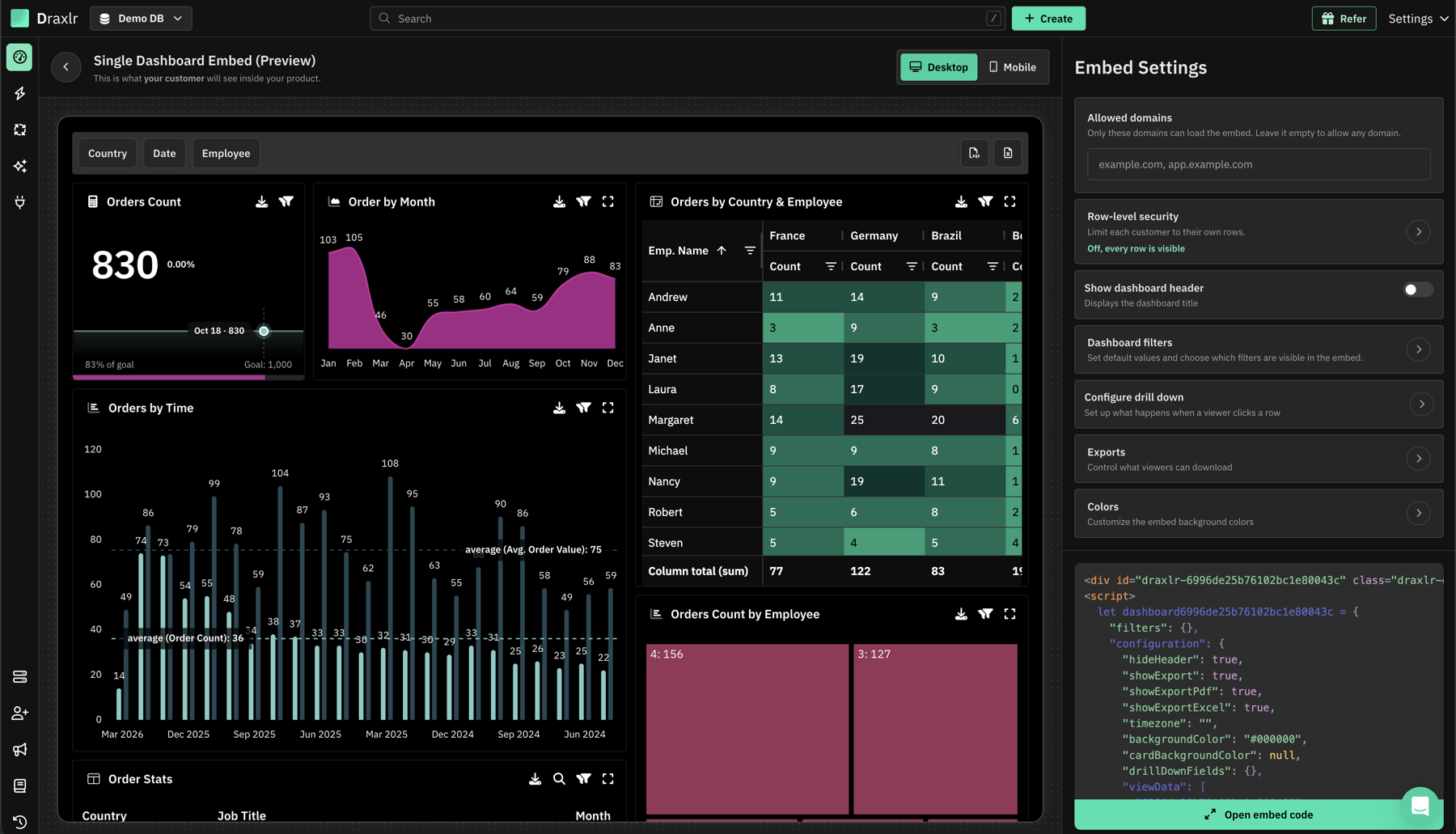
An orders dashboard in Draxlr's embed preview, shown the way a customer would see it inside your product: country, date and employee filters, an order count against its goal, monthly trends and an orders-by-country pivot table. The settings panel controls which domains can load the embed, row-level security, filters, drill-downs, exports and colors, then generates the HTML embed code.
How to Choose an Embedded Analytics Tool
Six things separate embedded analytics tools built for SaaS from BI tools with an embed option: server-side tenant isolation, pricing that doesn't grow per viewer, white labeling on your plan, a direct database connection, embed options for your stack, and a trial on real data. Isolation comes first. A leak between customers is the one mistake a patch can't undo.
The security questions we hear most from SaaS teams evaluating embedded analytics are specific. Is the viewer's identity carried in a signed, short-lived token? Does the row filter come from that token's claims, not from a URL parameter? And when customers or an AI write SQL, is it read-only and scoped to their tenant? Ask every vendor for a demo of each answer.
- Tenant isolation enforced on the server. Look for row-level security driven by the embed token, and check which plan it's on. A filter the browser can change isn't isolation. Then test it yourself: sign in as two customers and try to reach the other's rows.
- Pricing that doesn't grow with every viewer. Model the cost at 100, 500 and 1,000 customers. If the 500-customer number is a problem, the tool is the wrong fit, however cheap it looks at 10.
- White labeling on the plan you'll buy. It's often a tier up. Metabase includes it on Pro ($575/month) but not on Starter ($100/month), per its pricing page.
- A direct connection to your database. An ETL pipeline or semantic model adds setup time and upkeep.
- Embed options that fit your stack. An HTML snippet, React or Vue components, an iframe and a backend API each take different effort. Confirm the tool supports your frontend before comparing anything else.
- A free trial with your own data. A demo dataset won't show you how the tool copes with your schema.
How Much Does Embedded Analytics Cost?
At October 2026 list prices, giving 500 customers their own secured dashboards costs anywhere from a flat $250 a month to more than $6,000 a month. The gap comes from the pricing model, not the features. Per-user billing grows with every customer who logs in, while flat pricing stays the same as you grow.
The four pricing models work like this:
- Flat. One monthly price, whatever the viewer count. Draxlr embedding starts at $75/month (Premium), and the Power plan with row-level security is $250/month.
- Per user. Metabase Pro is $575/month with 10 users included, then $12 per user. With interactive embedding, every customer who signs in through your product counts as a user (Metabase pricing). At 500 customers, that's $6,455 a month. Static embeds don't count viewers, but they offer less interactivity.
- Usage-based. Luzmo starts from €1,995/month billed annually, with 500 AI conversations and 100 million data rows a month included and extra usage billed on top. Some contracts scale on monthly active users instead (Luzmo pricing).
- Capacity-based. Power BI Embedded's smallest A1 capacity costs about $736/month in US East ($1.0081/hour), and heavier concurrent use needs a larger SKU (Azure pricing).
Platform fees aren't the whole bill. Live queries add load to your database or warehouse, and someone has to wire the embed into your app and keep it working. Our embedded analytics cost guide walks through a full budget, and the embedded analytics pricing page compares tools side by side.
Is it cheaper to build it yourself?
Rarely, in our view, once you count upkeep. Customer-facing analytics keeps demanding time after launch. In a 2024 vendor survey of 356 US developers and analytics professionals, organizations reported spending 30 or more hours a week on analytics problems, and building customer-specific content topped the list at 33% (insightsoftware and Hanover Research, 2024). Teams that buy share some of that work. Teams that build own all of it, plus the charting, permissions and exports a vendor would otherwise maintain.
Building makes sense when the requirements are small and won't grow. Most don't stay small: customers ask for new reports, filters and exports, and that work competes with your roadmap. Our build-vs-buy breakdown has the full numbers.
How to Get Started With Embedded Analytics
Getting embedded analytics into your product takes five steps, whichever tool you choose. The order matters: start from the questions your customers ask, not from the tool's feature list, and test tenant isolation before any customer sees a dashboard.
- List the questions. Write down the five to ten questions customers ask most about their own data. Your support inbox is the best source. These become your first dashboards.
- Map the data. Find the tables that answer those questions, and the column that identifies each customer, such as
account_id. That column drives tenant isolation. - Pick the embed method. Choose an HTML snippet, a React or Vue component, or a backend API based on how your frontend is built.
- Build one dashboard on real data. Connect a staging copy, build one dashboard from step 1, set up row-level security and embed it in a staging build. Then sign in as two different test customers and confirm neither can see the other's rows.
- Ship small, then grow. Release to a few customers, watch which reports they open, and add more based on what they ask for next.
How do you know it's working?
Track a handful of numbers from launch day. Watch the share of active accounts that open a dashboard each month and how often they come back. Count how many data-question tickets still reach support. If you charge for analytics, track how many accounts upgrade for it. Then compare retention between accounts that use the dashboards and accounts that don't. Is usage flat after a quarter? The dashboards are probably answering the wrong questions.
Three mistakes to avoid
- Shipping too much on day one. A sprawling dashboard nobody reads is worse than three metrics tied to the outcome your product delivers.
- Reusing internal dashboards. A report built for a quarterly board review rarely works for a customer checking in between meetings. Keep it simple and fast to read.
- Getting the branding 80% right. A dashboard that almost matches your product looks worse than one that's clearly separate. If your app has a dark theme, the embed needs one too. See embedding dashboards in dark and light mode.
Start Embedding Analytics With Draxlr
Draxlr connects to your SQL database and lets you embed dashboards with HTML, React or Vue. The Premium plan ($75/month) includes white labeling, filters, drill-downs, exports and unlimited customer viewers. The Power plan ($250/month) adds row-level security and Full App Embedding. Every account starts with a 7-day free trial, no credit card required. To see the steps end to end, follow our guide to embedding a MySQL dashboard in your app.
Connect your DatabaseFAQs
1. What is embedded analytics?
Embedded analytics is reporting built into a software product, so users see dashboards, tables and metrics about their own data without switching to a separate BI tool. Gartner describes it as data analysis that happens within a user's natural workflow. In a SaaS product, each customer sees only their own account's data, under the product's branding.
2. What is multi-tenant embedded analytics?
Multi-tenant embedded analytics means every customer of a SaaS product sees only their own data in the same embedded dashboards. The boundary should be enforced on the server, usually with row-level security driven by a signed, short-lived embed token. A filter that the browser can change isn't isolation, so ask each vendor how theirs works.
3. What is white label embedded analytics?
White label embedded analytics means the dashboards inside your product carry your branding, not the vendor's: no third-party logos, no "powered by" badges, and colors that match your app. Some tools include white labeling on their first embedding plan and others reserve it for enterprise tiers. Draxlr includes it on every plan with embedding, from $75/month.
4. Can I embed analytics without a data engineering team?
Yes, if the tool connects straight to your SQL database. Tools that skip a separate data model or ETL pipeline let a developer, or a product manager using a query builder or AI assistant, ship the first dashboard in days. Tools built around a semantic layer need modeling work before anything can be embedded.
5. Do I need a data warehouse for embedded analytics?
No. Most embedded analytics tools connect directly to transactional databases such as PostgreSQL and MySQL, ideally through a read replica so customer dashboards don't slow your app. A warehouse like BigQuery or Snowflake helps once data volumes grow large or you need to combine many sources, but it's rarely the first step.
6. Is embedded analytics only for large SaaS companies?
No. Published prices now start below $100 a month, and a first dashboard can go live in days or weeks, not months. Whether you need it depends less on company size than on how much of your product's value shows up in data your customers want to see, such as usage, results or spend.
7. What is the difference between embedded analytics and data visualization?
Data visualization is the charts, tables and graphs that represent data. Embedded analytics is the whole system around them: connecting to the database, running queries, enforcing each customer's permissions, and delivering the result inside another application. Visualization is one part of embedded analytics, the part customers actually look at.
About the author

Ameena is the founder of Draxlr, a modern business intelligence platform focused on making data analysis simpler and faster. She writes about embedded analytics, databases, SQL, dashboards, and building scalable data products for modern teams.
If you have questions about anything in this guide, or want to compare options for your specific stack, you can try Draxlr free, or reach out directly through the Draxlr team.