Building a Natural Language SQL Interface with MCP: Architecture and Pitfalls
MCP lets an LLM query your database via typed tools, not raw SQL — the top model scores 0.824 on BIRD-SQL under blind review, still not production-safe alone
Every team that has tried "just let the LLM write the SQL" has hit the same wall: the model writes a query that's syntactically perfect and semantically wrong, or perfectly correct and catastrophically slow, or occasionally just deletes something it wasn't supposed to touch. The Model Context Protocol doesn't fix any of that automatically. What it gives you is a standard way to put guardrails around the parts that keep going wrong — the tool boundary, the schema context, and the tenant scope — so you're not reinventing them per LLM provider.
This guide walks through the actual architecture: how a request flows from a user's question to a query result, how to build the MCP server that sits in the middle, and the specific failure modes that show up once real users start typing real questions at it. If you'd rather see the finished pattern working end to end before building your own, connecting Claude to a SQL database through Draxlr's MCP server is a worked example of the same architecture.
Key Takeaways
- MCP standardizes tool discovery and invocation between an LLM host and your database, but it enforces no security by default — read-only access, tenant scoping, and query limits are entirely your server's responsibility.
- On BIRD-SQL under blind adjudicated review, the best-scoring model (claude-opus-5) reached 0.824 execution accuracy in a 2026 benchmark (AIMultiple, 2026) — strong, but not a number you can ship without validation layers underneath it.
- The safest architecture never lets the LLM's generated SQL touch a normal connection: it runs through a dedicated read-only role, a statement allowlist, and a row-limit ceiling enforced server-side, not by prompting the model to behave.
- Tenant context must come from your auth layer, not from the model's output — the same
SET LOCALpattern used for row-level security applies here, injected by the MCP server before the query runs.
What Is MCP and Why Does It Fit a Natural-Language SQL Interface?
MCP is an open protocol, introduced by Anthropic in November 2024, that standardizes how an LLM application (the "host") discovers and calls tools exposed by a separate process (the "server") (Model Context Protocol, 2026). For a database use case, the server exposes a small set of typed tools — run_query, list_tables, describe_schema — instead of handing the model a raw connection string.
That distinction matters more than it sounds. Without MCP, "connecting an LLM to a database" usually means writing SQL execution into a system prompt and hoping the model's tool-calling stays inside the lines. With MCP, the tool boundary is enforced by the server process, not by prompt instructions. The LLM can only request what a defined tool schema allows — it cannot invent a new capability by writing a more creative prompt.
As of the 2026-07-28 specification release, MCP defines three primitives: tools (actions the model can invoke), resources (read-only context the host can pull in, like a schema description), and prompts (reusable templates). A SQL interface uses all three — tools to run queries, resources to expose schema and sample data, and prompts to give the model a consistent starting frame for query generation.
How Does a Request Flow From a User's Question to a Query Result?
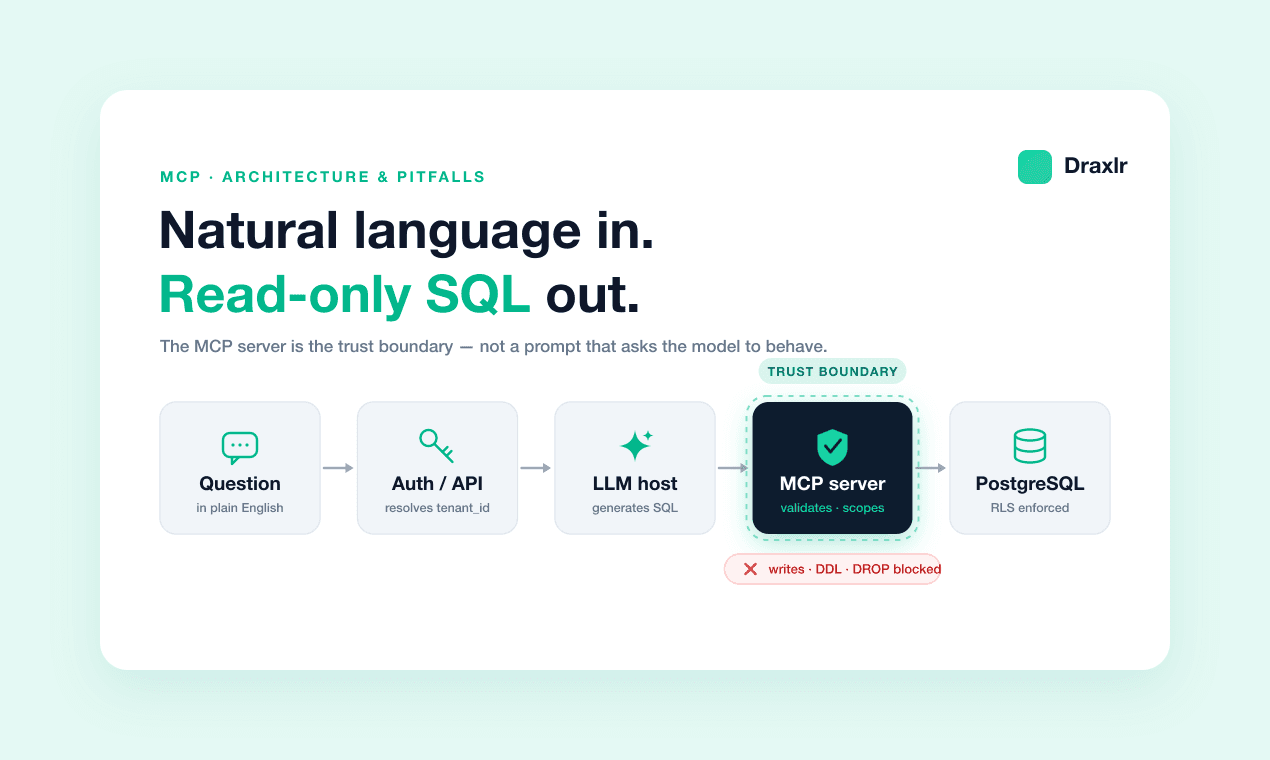
The architecture has five hops, and the tenant-scoping decision has to happen at hop two — not inside the SQL the model generates. If tenant identity only shows up as a WHERE clause the model was told to add, a single malformed prompt or a model that "forgets" the instruction produces a cross-tenant leak.
End user (asks a question in your product's UI)
  → Your API server (authenticates the user, resolves tenant_id from the session)
  → LLM host (sends the question + schema resource to the model)
  → MCP client (the model requests the run_query tool with generated SQL)
  → MCP server (validates the SQL, injects tenant context, executes read-only)
  → PostgreSQL (RLS policy applies automatically, per SET LOCAL app.current_tenant)
The MCP server is the trust boundary. It receives a tool call from the model — which it must treat as untrusted input, the same way you'd treat a request body from a browser — and it's the only component that holds the real database credentials. The model never sees a connection string, and the tenant ID never comes from anything the model wrote.
This is the same isolation problem row-level security for multi-tenant analytics solves for embedded dashboards. An MCP-backed SQL interface is just a new query origin hitting the same database — it needs the same SET LOCAL app.current_tenant discipline, not a parallel security model.
How Do You Build the MCP Server's SQL Tool?
The tool definition is the contract that keeps the model's output structured. Here's a minimal run_query tool built with the TypeScript MCP SDK, wired to a read-only Postgres role:
import { McpServer } from "@modelcontextprotocol/sdk/server/mcp.js";
import { z } from "zod";
import { Pool } from "pg";

const pool = new Pool({ connectionString: process.env.READONLY_DB_URL });
const server = new McpServer({ name: "sql-interface", version: "1.0.0" });

server.registerTool(
  "run_query",
  {
    title: "Run a read-only SQL query",
    description:
      "Executes a single SELECT statement against the tenant's data. " +
      "No writes, no DDL, no multi-statement queries.",
    inputSchema: {
      sql: z.string().describe("A single SELECT statement, no semicolons"),
      tenantId: z.string().uuid(),
    },
  },
  async ({ sql, tenantId }) => {
    assertReadOnlySelect(sql);          // reject anything but a single SELECT
    assertRowLimit(sql, 1000);          // inject or verify a LIMIT clause

    const client = await pool.connect();
    try {
      await client.query("BEGIN");
      await client.query("SET LOCAL app.current_tenant = $1", [tenantId]);
      await client.query("SET LOCAL statement_timeout = '5s'");
      const result = await client.query(sql);
      await client.query("COMMIT");
      return { content: [{ type: "text", text: JSON.stringify(result.rows) }] };
    } catch (err) {
      await client.query("ROLLBACK");
      throw err;
    } finally {
      client.release();
    }
  }
);
Three things in this handler are load-bearing, not optional hardening: assertReadOnlySelect rejects anything that isn't a single SELECT, SET LOCAL app.current_tenant scopes the RLS policy to this transaction only (see the connection-pool-safe pattern for why session-level SET leaks across pooled connections), and statement_timeout caps how long a bad query — a Cartesian join the model didn't mean to write — can hold a connection.
How Do You Keep the LLM From Running Destructive or Runaway Queries?
Never rely on the system prompt saying "only run SELECT statements." Prompt instructions are a request, not a constraint, and jailbreak-style inputs from end users (a question that embeds SQL-injection-style text) can push a model to ignore them. Enforce every guardrail in the MCP server's code, in this order:
- Database role, not prompt text. Create a role that has
SELECTgrants only, noINSERT/UPDATE/DELETE/DDLprivileges. Even if validation code has a bug, the database itself refuses the write. - Statement-level allowlist. Parse the generated SQL (a lightweight SQL parser, not a regex) and reject anything that isn't a single
SELECT. Reject multiple statements separated by semicolons — a classic SQL-injection pattern that also defeats naive string checks. - Row and time limits. Inject a
LIMITif the model's query doesn't include one, and enforce astatement_timeoutserver-side. A model asked "show me everything" will happily generateSELECT * FROM eventsagainst a 50-million-row table. - Tenant context from auth, never from the tool call. Resolve
tenantIdfrom the authenticated session on your API server, and pass it to the MCP server through a channel the model doesn't control — not as a parameter the model fills in from the conversation.
| Guardrail | Enforced where | Fails safe if skipped? |
|---|---|---|
| Read-only role | Database grants | Yes — write attempts error out |
| SQL parser allowlist | MCP server, before execution | No — a gap here reaches the database |
| Row limit / timeout | MCP server + database session | Partially — timeout still caps damage |
| Tenant scoping | Auth layer + RLS policy | Yes, if RLS is FORCE-enabled |
| "Only run SELECT" prompt text | System prompt | No — not a real control |
The pattern that fails is treating the last row as if it belonged with the first four. A prompt instruction is advisory. Everything the model can't bypass has to live in code or database grants.
How Do You Give the LLM Enough Schema Context Without Overwhelming It?
The model can't write a correct query against a schema it hasn't seen, but dumping your entire information_schema into every prompt burns tokens and buries the columns that actually matter. Expose schema as an MCP resource — read-only context the host fetches once and reuses — rather than re-describing it in every tool call.
server.registerResource(
  "schema",
  "schema://public",
  { title: "Database schema", mimeType: "application/json" },
  async () => {
    const tables = await getVisibleTables();   // filter to allowlisted tables
    return {
      contents: [{
        uri: "schema://public",
        text: JSON.stringify(tables.map(t => ({
          name: t.name,
          columns: t.columns,               // name, type, and a short comment
          sampleRows: t.sampleRows.slice(0, 3), // a few real rows, not fabricated ones
        }))),
      }],
    };
  }
);
Two details determine whether this resource actually improves accuracy. First, filter getVisibleTables() to an explicit allowlist — don't expose internal tables (billing, audit logs, admin-only data) just because they're in the same database. Second, include column comments and a handful of real sample rows. Column names like status or type are ambiguous without an example value; three sample rows resolve most of that ambiguity for a fraction of the token cost of full documentation.
If your product already exposes schema context and query building to non-technical users through an existing tool — something like Draxlr's embedded analytics — the schema-resource layer you build for MCP can often reuse the same table allowlist and column metadata you've already curated for that UI, rather than maintaining two parallel descriptions of what's queryable.
What Actually Goes Wrong Once Real Users Start Asking Questions?
The failure modes that show up in production skew differently than the ones benchmarks measure. Four are worth building for before launch, not after the first incident.
Ambiguous column names produce confidently wrong answers, not errors. A user asks "how many active customers do we have," and the model picks status = 'active' on a table where "active" actually means "not yet onboarded" in your domain's vocabulary. The query runs, returns a number, and nothing about the response looks wrong. This is worse than a crash — add column comments describing what values actually mean, and consider a describe_schema tool the model can call before generating SQL on an unfamiliar table.
Schema drift breaks silently between deploys. If your schema resource is generated at server startup and cached, a migration that renames a column mid-session leaves the model working from stale metadata. Regenerate the resource on a short TTL, or invalidate it on migration deploy — the 2026-07-28 spec's ttlMs cache hints on resource reads exist for exactly this (Model Context Protocol blog, 2026).
Benchmark accuracy doesn't transfer to your schema. In a 2026 evaluation of 36 models against BIRD-SQL under blind adjudicated review — the strictest of three scoring methods used, correcting for format-equivalent answers that stricter automated scoring wrongly marks wrong — the top model reached 0.824 execution accuracy, and even claude-sonnet-5 gained 39.9 points once benchmark-scoring artifacts were corrected for, moving from 0.311 to 0.710 (AIMultiple, 2026). Your schema wasn't in that benchmark. Track real accuracy against your own query logs from day one — a sample of 50 real user questions with human-verified expected results tells you more than any published leaderboard.
Large aggregations time out or return misleading partial data. A GROUP BY across a wide date range on an unindexed timestamp column can take longer than your statement_timeout allows, and the tool call fails with no useful signal to the model about why. Give the model a way to see that distinction — return a structured error ("query exceeded time limit, try narrowing the date range") rather than a generic tool failure, so it can retry productively instead of guessing.
Frequently Asked Questions
Does MCP itself provide security for database access?
No. MCP standardizes how tools are discovered and invoked, but it enforces no read-only guarantee, no tenant isolation, and no query validation by default. All of that is the responsibility of the MCP server implementation — the read-only database role, SQL allowlist, and tenant-context injection have to be built by whoever writes the server.
Can I let the LLM write arbitrary SQL if I trust the model?
No. Treat every tool call from the model as untrusted input, the same way you'd treat a request body from an untrusted client. Even a well-behaved model can generate a query that's technically valid but catastrophic — a full-table scan, a Cartesian join, or a query against a table it shouldn't see. Enforce guardrails in code and database grants, not in the model's judgment.
How accurate is natural-language-to-SQL in 2026?
Under blind adjudicated review on BIRD-SQL, the best-performing model in a 2026 benchmark reached 0.824 execution accuracy across 36 models tested, with wide variance by scoring method — the same models scored as low as 0.190 under strict automated matching before format-equivalent answers were corrected for (AIMultiple, 2026). Treat any accuracy number as a ceiling for your best-case schema, not a guarantee for yours.
Should I use MCP or a fine-tuned text-to-SQL model?
They're not mutually exclusive. MCP is a transport and tool-boundary standard — it works with any model, including one fine-tuned for SQL generation. Most teams start with a general-purpose model behind an MCP server because it ships faster and improves as the underlying model improves, then consider fine-tuning only after production query logs show a specific, recurring accuracy gap.
Conclusion
MCP solves the coordination problem — a standard way for an LLM host to discover and call a run_query tool without every team inventing its own protocol. It does not solve the security problem or the accuracy problem, and treating it as if it does is where natural-language SQL interfaces get into trouble. The read-only role, the SQL allowlist, the row limits, and the tenant-scoped SET LOCAL context all have to be built the same way they would for any other untrusted client hitting your database.
Build the guardrails first, measure accuracy against your own schema and real user questions second, and treat every published benchmark number as a ceiling, not a promise.
About the author

Vivek is a coder and the founder of Draxlr who cares deeply about building good products. He works at the intersection of AI, SQL, dashboards, and embedded analytics, with a strong focus on making complex data workflows feel simple, useful, and fast for real teams.
If you have questions about anything in this guide, or want to compare options for your specific stack, you can email Vivek at vivek@draxlr.com, try Draxlr free, or reach out directly through the Draxlr team.