White-Labeling Embedded Dashboards: Theming, Domains, Branding
Let's Encrypt caps issuance at 50 certs per domain weekly. How to build white-label theming, custom domains, and branding without forking your analytics tool.
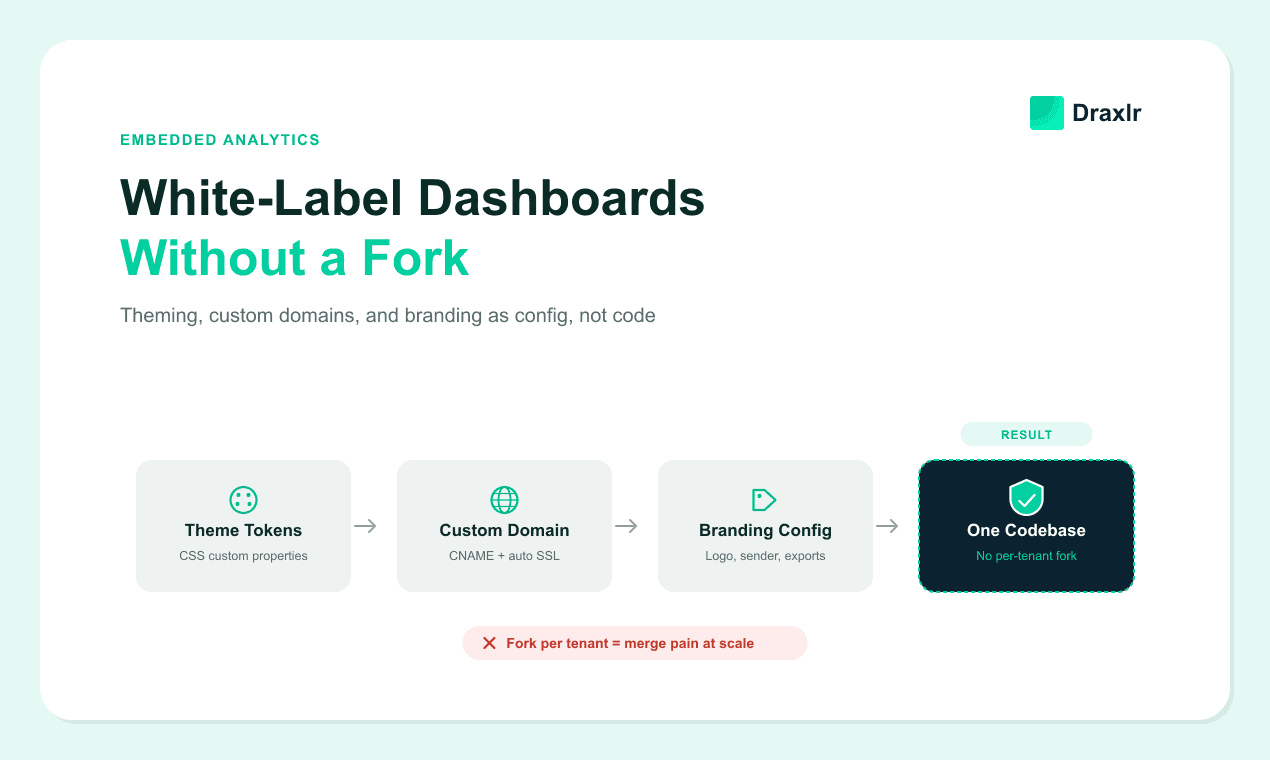
"White label" shows up on almost every embedded analytics pricing page, but it isn't one feature. It's three separate engineering problems — a runtime theming layer, a custom-domain and SSL pipeline, and a branding-config surface — bundled under one marketing word. Teams that don't split them apart usually solve all three the same way: they fork the tool's source and hand-edit it per customer.
That approach works for the first client. It stops working around the third or fourth, when merging upstream fixes into three divergent forks becomes its own part-time job. This guide covers how to build each of the three layers as configuration instead of code, so a new tenant's branding is a database row, not a branch.
For what vendors actually include in "white label" pricing tiers versus what they gate behind an enterprise plan, see our buyer's-side breakdown of white label analytics — this piece is about building the layers yourself, not shopping for them.
Key Takeaways
- White-labeling embedded dashboards is three separable problems: runtime theming (CSS custom properties), custom domains (CNAME + automated SSL), and branding config (logos, sender names, PDF headers as data).
- Cloudflare's SSL for SaaS provisions and renews a certificate per customer domain from a single API call, with no manual step on your side (Cloudflare, 2026 — cited in full below).
- Let's Encrypt allows up to 50 certificates per registered domain per week under a token-bucket limiter, and renewals are exempt from that cap entirely (Let's Encrypt, 2026) — a real constraint if you're issuing certificates per tenant subdomain yourself.
- Design-token count is the leading indicator of theming debt: if the number of tokens is growing faster than the number of tenants, the theming layer has quietly turned back into per-tenant forking, just written in CSS instead of application code.
What Does "White-Label Without Forking" Actually Require?
White-labeling without forking means every visual and identity difference between tenants lives in configuration that your single deployed codebase reads at request time, not in a customer-specific branch of your source.
In practice that's three layers. A theming layer renders colors, fonts, and logos from tokens; a domain layer makes each tenant's dashboard reachable at their own subdomain or custom domain, with valid SSL; a branding layer carries the tenant's name and identity into emails, exports, and page titles, not just on-screen.
Forking breaks down for the same reason any code fork does. Every bug fix and every new feature has to be applied N times, and N grows every time you sign a customer who wants a color change. A config-driven system pays a one-time cost — building the theming and domain plumbing — and then onboarding a new tenant is a data-entry task, not a deploy.
The tell that a white-label system was built as forks rather than config is usually visible in the support queue, not the code. Look for "can we get X color changed" tickets that take days instead of minutes. If updating a tenant's brand requires a pull request, the system is still forked in spirit — even if it's technically one codebase with feature flags.
How Do You Build a Runtime Theming Layer with CSS Custom Properties?
CSS custom properties (--brand-primary: #0ea5e9;) let you swap an entire visual theme at runtime by changing values in one :root block, with no JavaScript framework and no rebuild step. The browser recomputes every rule that references the variable the moment it changes (MDN Web Docs, Using CSS custom properties (variables), 2026). That's the mechanism that makes per-tenant theming a data problem instead of a build-pipeline problem.
The pattern that scales is a two-layer token model: primitive tokens hold raw values (--blue-500: #0ea5e9), and semantic tokens reference them by purpose (--brand-primary: var(--blue-500)). Components only ever read semantic tokens, so a full rebrand is changing what the semantic layer points to, not touching component CSS at all.
:root {
  /* primitive tokens - raw values */
  --tenant-accent-500: #0ea5e9;
  --tenant-accent-600: #0284c7;

  /* semantic tokens - what components actually use */
  --brand-primary: var(--tenant-accent-500);
  --brand-primary-hover: var(--tenant-accent-600);
  --brand-logo-url: url("/tenants/acme/logo.svg");
}
At request time, resolve the tenant from the host header or session, look up their token JSON, and inject it as an inline <style> block in the document head, before any component CSS loads. That ordering matters: inject the tokens after the layout paints and you get a flash of default-branded content, which reads as broken to a tenant checking their own white-labeled instance.
Token count is the leading indicator of whether this architecture is holding up. A well-run semantic layer lets a new tenant reuse most existing tokens, adding only a handful of brand-specific overrides on top.
A system where token count grows faster than tenant count is showing the opposite pattern: one-off overrides accumulating per client instead of new tenants slotting into the existing semantic layer. At that point the theming layer has quietly turned back into per-tenant forking, just written in CSS instead of application code.
How Do You Route and Provision SSL for Customer-Owned Custom Domains?
A custom domain (dashboards.customer.com instead of customer.yourapp.com) requires three things working together. The customer points a CNAME at your platform, your system verifies they actually control that domain, and a valid SSL certificate gets issued and renewed for it automatically — all before their first page load, without you touching a terminal.
Verifying Domain Ownership
The verification step is what most homegrown implementations get wrong first. A CNAME pointing at your infrastructure isn't proof of ownership by itself — anyone can create a CNAME record. The safe pattern is a two-step handshake: the customer adds the CNAME, your system polls DNS to confirm it resolves to your platform, and only then triggers certificate issuance.
That issuance step uses either an HTTP-01 challenge (a file your server serves at a well-known path) or a DNS-01 challenge (a TXT record the customer must also create) to prove control before the certificate authority signs anything.
Certificate Issuance and Rate Limits
Certificate issuance itself is where rate limits bite if you build it yourself with a raw ACME client. In 2026, Let's Encrypt allows up to 50 certificates per registered domain per week (Let's Encrypt, Rate Limits, 2026). That cap is enforced through a token-bucket limiter introduced in 2025 that refills continuously rather than resetting on a fixed weekly window, and it separately caps new orders at 300 per account per three hours.
Renewals are exempt from the per-domain cap entirely when you use ACME Renewal Info (ARI), which matters once you're managing renewals for hundreds of tenant subdomains on one account.
customer.com → CNAME → dashboards.yourplatform.com
A custom domain also changes your embedding tool's allowed-origin list — if dashboards are embedded via a signed, tenant-scoped token, the token's origin check needs to accept each tenant's custom domain, not just your platform's own domain, or the embed silently breaks the moment a customer finishes their domain setup.
Managed SSL Options: Cloudflare and Vercel
Rather than operating that pipeline yourself, two managed paths avoid building it at all. Cloudflare's SSL for SaaS product issues a certificate per custom hostname from a single API call once the CNAME is in place (Cloudflare, Create custom hostnames, 2026). It bundles a P-256 and an RSA certificate for broad browser compatibility and handles renewal without further action on your side; wildcard certificates covering an entire customer subdomain are an Enterprise-tier feature.
Vercel's Domains API takes a similar approach for Next.js-based platforms: certificates for a newly verified domain provision in under five seconds, and the platform handles renewal automatically across unlimited tenant domains (Vercel, Multi-Tenant Platforms, 2026).
Managed Domain Platforms vs. Self-Hosted ACME
| Dimension | Cloudflare for SaaS | Vercel Domains API | Self-hosted ACME (Certbot/Caddy) |
|---|---|---|---|
| Onboarding a new domain | One API call after CNAME is set | SDK/REST call; cert in <5s | You write the verification + issuance flow |
| Certificate renewal | Automatic | Automatic | You schedule and monitor it |
| Rate-limit exposure | Abstracted away by the platform | Abstracted away by the platform | Directly hits Let's Encrypt's per-domain and per-account limits |
| Wildcard subdomain certs | Enterprise tier only | Not the primary pattern (per-domain certs) | Possible via DNS-01, fully your maintenance burden |
| Best fit | Any stack, proxied through Cloudflare's edge | Next.js apps already deployed on Vercel | Teams with existing infra and ACME expertise, or compliance reasons to self-host |
Feature availability changes by vendor tier and account type; verify current terms before committing an architecture to one path.
Self-hosting the ACME flow makes sense mainly when you already run your own edge infrastructure or have a compliance reason to keep certificate issuance in-house. For most teams, the managed path is cheaper in engineering time than the rate-limit and renewal-monitoring code a self-hosted pipeline requires — the failure mode of a missed renewal is a hard outage for that one tenant, discovered when their dashboard shows a browser certificate warning.
Keeping White-Label Branding Config Out of Forked Code
Beyond theming and domains, branding is the third layer — and it's more than the CSS a tenant sees on screen — it's the sender name on a scheduled-report email, the header on a PDF export, the favicon in a browser tab, and the product name shown in error messages. Each of these needs to read from the same per-tenant config record the theming layer uses.
Skip that and you end up with a dashboard that looks correctly branded but sends emails from your own company's name — a mismatch that undermines the entire point of white-labeling for a customer showing the product to their own end users.
The config-as-data pattern is a single table or document per tenant holding every brand-dependent value:
{
  "tenant_id": "acme-042",
  "app_name": "Acme Insights",
  "logo_url": "/tenants/acme-042/logo.svg",
  "favicon_url": "/tenants/acme-042/favicon.ico",
  "email_sender_name": "Acme Insights Reports",
  "pdf_header_logo": "/tenants/acme-042/logo-print.svg",
  "primary_domain": "dashboards.acme.com"
}
Every surface that emits tenant-facing output — the web app, the email service, the PDF export job — reads from this same record instead of a hardcoded string or a per-tenant environment variable. That's the difference between branding-as-config and branding-as-deploy-time-setting: an environment variable requires a redeploy to change; a database row is editable from an admin panel in seconds.
The export pipeline is where this gets missed most often, because it's usually built after the on-screen theming already works and gets treated as an afterthought. A scheduled PDF report or CSV export that still shows your company's logo, sent from a tenant's dashboard, is the fastest way to make a white-label customer notice the seams — worth auditing explicitly rather than assuming it inherited the same config the web UI did.
If you're embedding an analytics layer on top of your own app rather than building dashboards from scratch, this is also where the embedding tool's own white-label surface matters. A tool like Draxlr exposes per-tenant branding and theming as configuration in its embedding API, so your application can pass a tenant's brand config through at render time instead of maintaining a fork of the analytics tool itself.
Common Pitfalls in Production
In practice, three failure modes account for most of the production incidents on a system like this. Cache keys are the most common silent failure. If your CDN or reverse proxy caches responses by URL path alone and your theming or branding is resolved from the Host header, two tenants sharing the same path can serve each other's cached, wrong-branded page.
The cache key must include the host, not just the path, or this surfaces intermittently and is hard to reproduce in staging with a single test domain — the same host-based tenant resolution that a row-level or schema-level isolation model depends on further down the stack has to stay consistent all the way up to the edge cache.
DNS propagation delay is the second-most-common support ticket. A customer adds their CNAME and expects it to work instantly, but DNS can take minutes to hours to propagate globally. If your verification polling gives up too early, you'll incorrectly tell the customer their domain setup failed when it just hasn't propagated yet — poll with backoff over a window of at least 30-60 minutes before surfacing a failure state.
Certificate renewal race conditions round out the list: if your renewal job and your DNS-verification job for the same domain can run concurrently, a domain mid-verification can get a renewal attempt against a certificate that doesn't exist yet. Serializing per-domain operations behind a lock keyed on the domain, not the tenant ID, avoids this — a tenant can have multiple domains mid-transition at once.
Frequently Asked Questions
Do I need wildcard SSL certificates for white-labeled dashboards?
Only if you're issuing tenant subdomains dynamically under one domain you control (tenant.yourapp.com) and want a single certificate to cover all of them. For customer-owned custom domains (dashboards.customer.com), you need a per-domain certificate regardless, since a wildcard on your domain can't cover a domain the customer owns.
Can I white-label without touching the embedding tool's source code at all?
Yes, if the tool exposes theming and branding as a runtime API or config surface rather than requiring template edits. Check specifically whether logo, colors, custom domain, and export branding (PDF/email) are all configurable via API or admin panel — some tools cover on-screen theming but still hardcode branding in exports, which forces a partial fork anyway.
How long does SSL provisioning take for a new custom domain?
With a managed platform, typically seconds to a couple of minutes once DNS verification passes — Vercel reports certificate issuance in under 5 seconds after domain verification. Self-hosted ACME flows depend on your own polling and retry logic, and Let's Encrypt's validation step alone typically completes within seconds once the challenge is correctly served.
What's the difference between subdomain and custom domain white-labeling?
A subdomain (acme.yourapp.com) keeps your domain visible and is simpler to provision, often covered by one wildcard certificate. A fully custom domain (dashboards.acme.com) hides your platform entirely from the tenant's end users but requires per-domain CNAME setup, ownership verification, and individual certificate issuance for each customer.
How many design tokens should a white-label theming system need per tenant?
There's no fixed number, but the pattern to watch for is growth outpacing tenant count: a well-architected semantic token layer should let a new tenant reuse most existing tokens, with only a handful of brand-specific overrides. Systems that instead add new one-off tokens per client are heading toward the same sprawl that quietly turns a theming layer back into per-tenant forking, just written in CSS.
Conclusion
Forking is what happens by default when white-labeling gets built feature-by-feature under deadline pressure — a color override here, a custom domain hack there, until three customers means three divergent codebases. Splitting the problem into three explicit layers up front, a semantic CSS token system, an automated domain-and-SSL pipeline, and a config record covering every branded surface, turns onboarding a new white-label tenant back into what it should be: filling in a form, not opening a pull request.
The technical cost is front-loaded — building the token architecture and the domain automation takes real engineering time before the first tenant benefits. The payoff shows up in the tenth tenant, when adding them takes an afternoon instead of a sprint.
If you're evaluating vendors instead of building this yourself, the buyer-side breakdown linked in the introduction covers what each pricing tier actually includes. For the fundamentals of embedding analytics generally, start with what embedded analytics is.
About the author

Vivek is a coder and the founder of Draxlr who cares deeply about building good products. He works at the intersection of AI, SQL, dashboards, and embedded analytics, with a strong focus on making complex data workflows feel simple, useful, and fast for real teams.
If you have questions about anything in this guide, or want to compare options for your specific stack, you can email Vivek at vivek@draxlr.com, try Draxlr free, or reach out directly through the Draxlr team.