How to send Stripe MRR and Gross revenue alerts to Slack for free
Send Stripe MRR and gross revenue alerts to Slack for free. Set up Revenue Tracker in minutes and get a daily revenue update automatically every day.
If you are a SaaS founder, Stripe is usually a daily check. You open it, refresh, scan the numbers, and move on.
Instead of doing that manually, it is easier to get a short daily Slack message that tells you:
- What is the gross revenue
- What is our current MRR
This guide shows the easiest and free way to do that using Revenue Tracker, a free tool built by Draxlr that sends your Stripe MRR and gross revenue straight into the Slack channel you choose.
MRR vs Gross Revenue: Quick Definitions
1. What is Monthly Recurring Revenue (MRR)?
MRR is your predictable recurring subscription revenue normalized to a monthly number. Stripe describes MRR as a way to measure predictable recurring income and to forecast and track growth trends.
If your business is subscription based, MRR is the heartbeat that shows whether you are building a stable base.
2. What is Gross Revenue?
Gross revenue is the total amount collected from successful payments in a given time period. A daily alert turns that into one number for yesterday, so you can track revenue day by day.
MRR is your recurring baseline. Gross revenue is your daily total.
A simple example:
- Yesterday you receive a few large annual payments, so gross revenue for the day goes up.
- But MRR may stay mostly the same, because those annual payments are spread across months when converted into a monthly recurring number.
That is why it helps to see both. One shows what came in yesterday, the other shows your steady recurring baseline.
Why send Stripe MRR and revenue alerts to Slack
Slack is where you as a SaaS founder already spend most of your day, so it is a convenient place to get a daily revenue check. Instead of opening Stripe, clicking around, and repeating the same steps, you get one short message that tells you what you need.
Benefits:
- You see your numbers without switching tabs
- The update is consistent, so you do not forget to check
- You can scroll back and compare days quickly
Keep it as a summary. One message a day is enough.
How to send Stripe notifications to Slack
Before we get to the free setup, here are the common options you can consider.
Option 1: The Stripe app for Slack
Slack has an official Stripe app that can post updates for events like charges and subscriptions. This is useful if you want event notifications.
The downside: It is not designed to be a clean daily digest of MRR and gross revenue. Event streams can become noisy fast.
Option 2: Automation tools like Zapier
Automation tools can connect Stripe triggers to Slack messages. For example, posting to Slack when a new Stripe customer is created.
The downside: Most setups become event based, not summary based. Also, free tiers often limit how many automations you can run or how frequently they run.
Option 3: Build your own Stripe webhook to Slack
Stripe webhooks are powerful and flexible, and many teams build custom pipelines for internal notifications.
The downside: You need to host an endpoint, handle retries, verify signatures, and maintain the integration over time. It works, but it is not the “free and simple” path most founders want.
Option 4: Use Revenue Tracker for free
Revenue Tracker is a free tool built by Draxlr that sends your Stripe MRR and gross revenue straight into Slack.
What it does:
- You connect Stripe and Slack once
- It calculates your previous day’s MRR and gross revenue
- It sends a simple daily summary to the Slack channel you selected
It is intentionally not a heavy analytics product. The goal is a reliable daily revenue heartbeat in Slack.
Important trust details from the product FAQ:
- It only reads data from your Stripe account to generate alerts
- It does not modify your Stripe data or settings
- It is completely free for sending daily MRR and gross revenue alerts to Slack
How to set up Revenue Tracker to get Stripe MRR and gross revenue alerts to Slack
Step 1: Sign up
On the Revenue Tracker page, you can start the setup to send Stripe MRR and gross revenue updates to Slack.
Sign Up to Revenue TrackerStep 2: Connect Stripe
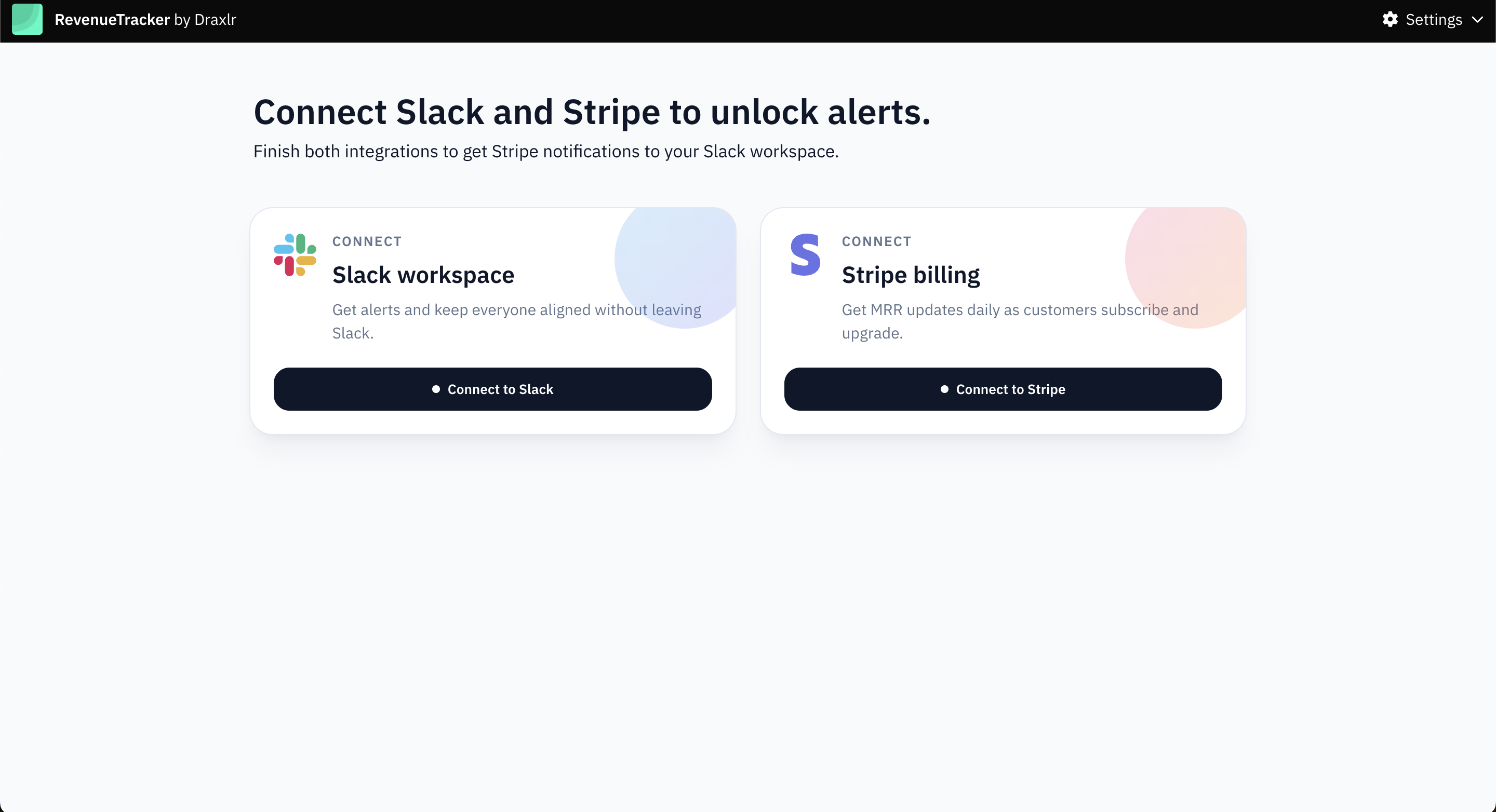
Link your Stripe account so Revenue Tracker can compute daily MRR and gross revenue.
This is read only access for generating alerts, not for changing anything in Stripe.
Step 3: Connect Slack
Choose the Slack workspace where you want the daily message to be present.
Step 4: Select a Slack channel for the alerts
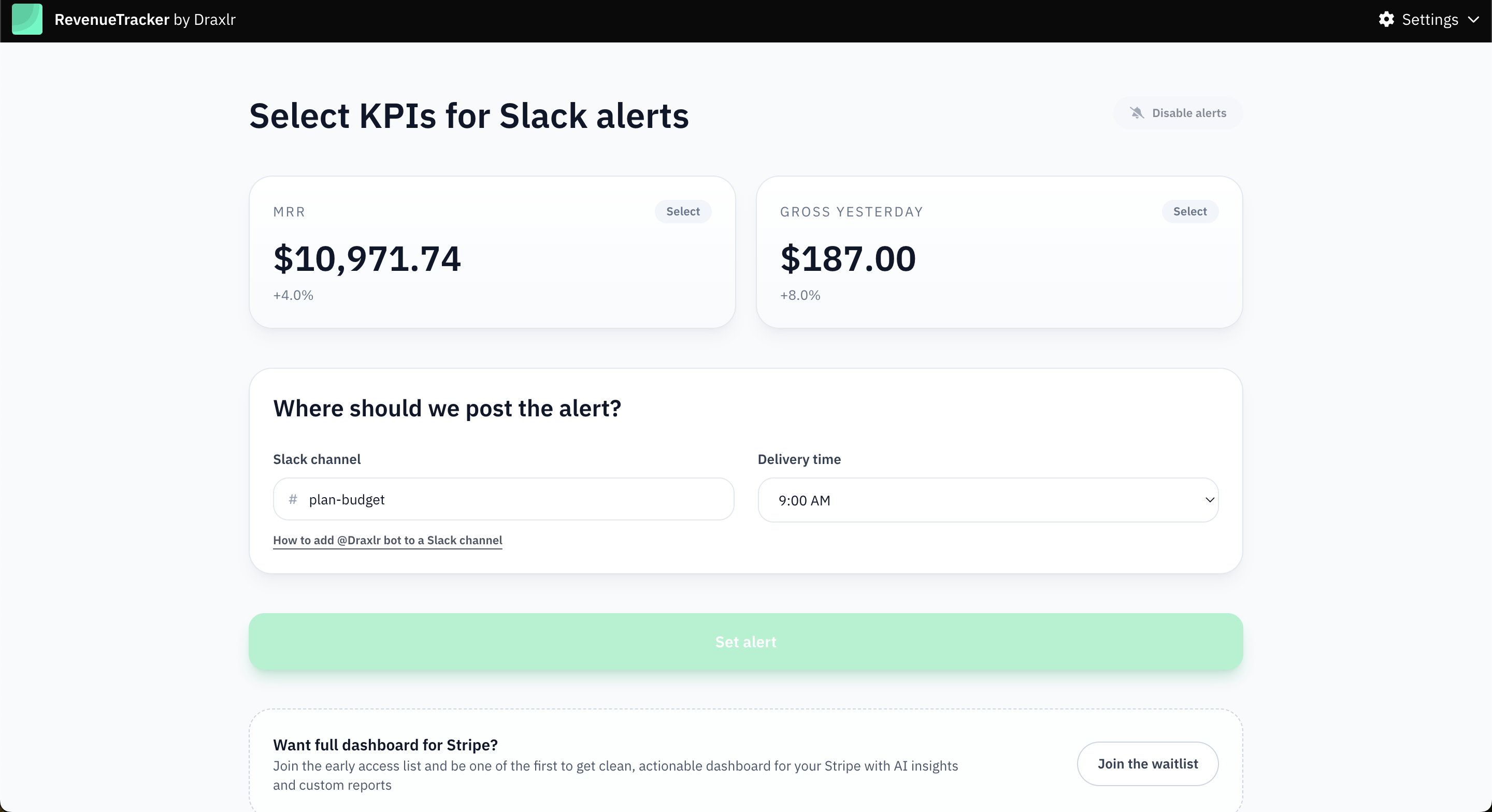
Pick a Slack channel that you personally check every day, so the update is easy to notice without changing your routine. Many founders use a private channel or a dedicated channel like revenue.
Revenue Tracker will send the daily summary to the channel you select.
What the daily Slack message looks like
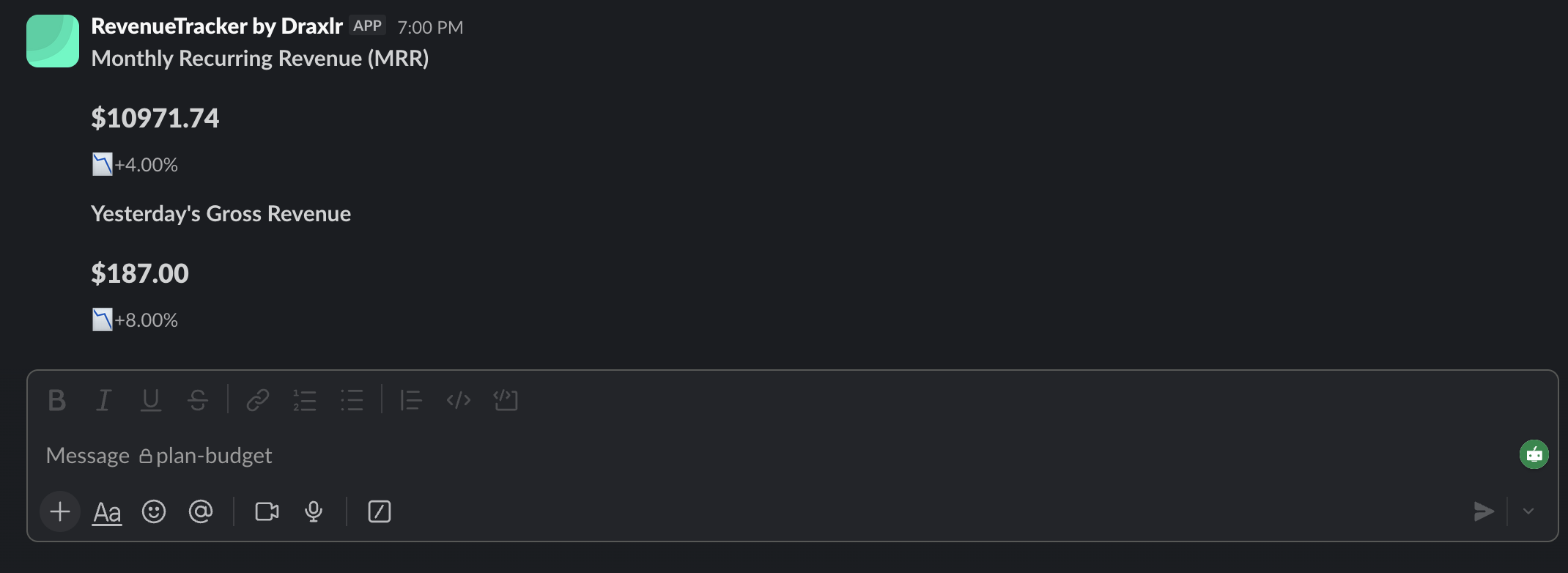
Revenue Tracker is designed to be easy to scan. The Slack message shows:
- Today’s Gross Revenue with a percentage change
- Monthly Recurring Revenue (MRR) with a percentage change
This formatting works well for founders because:
- You get the number immediately
- You see whether it is up or down at a glance
- You can scroll back and compare recent days without opening Stripe
Best practices to get real value from daily revenue alerts
1. Choose the right channel
A good default is a channel that includes founders and whoever owns growth and retention.
If the channel is too broad, people mute it.
If the channel is too private, it does not build team alignment.
2. Create a tiny daily ritual
A simple routine that works:
- Check the message
- If there is a spike or dip, add a one line note in a thread
That is enough to build context over time.
3. Keep the alert summary focused
Daily digests work because they avoid alert fatigue. If you also need per payment events, use the Slack Stripe app for that, and keep your daily digest separate.
4. Use MRR and gross revenue together to diagnose faster
If gross revenue drops but MRR stays stable:
- Look for refunds, payment failures, or one time purchase dips
If MRR drops:
- Look for churn, downgrades, or cancellations
MRR is tied to your active subscription base, so it is an early signal for retention work.
Conclusion
If your goal is simple, daily visibility without extra cost, Revenue Tracker built by Draxlr is the cleanest path to get revenue updates. Once it is set up, you get the revenue update every day, in the place you already work.
FAQs
1. What does Revenue Tracker actually do?
It sends a daily Slack message with your previous day’s MRR and gross revenue from Stripe.
2. Is this only for Stripe?
Yes, it is for Stripe currently.
3. Do I need a data warehouse or a BI tool?
No. Revenue Tracker plugs into billing data directly and focuses on alerts, not dashboards.
4. Does this modify anything in my Stripe account?
No. It only reads Stripe data to generate alerts and does not change your data or settings.