Best Qlik Alternatives in 2026
Explore the best Qlik alternatives in 2026. Compare top BI tools like Draxlr, Tableau, Power BI & more to find the right fit for your team.
Qlik is powerful but it's not always the right fit. Whether it's the steep learning curve, high licensing costs, or the need for something more modern and lightweight, thousands of teams are searching for Qlik alternatives that better match how they actually work in 2026.
In this blog, we've put together a definitive list of the top Qlik alternatives you can try. Let's dive in.
Why Teams Look for Qlik Alternatives
Qlik has long been recognized for its associative data engine and strong enterprise analytics. But in 2026, the BI landscape has shifted significantly. Teams now expect tools that are faster to set up, easier to use, and more affordable, especially as cloud-native, AI-powered platforms have raised the bar.
Here are the most common reasons teams are actively searching for Qlik alternatives:
- High cost — Qlik's licensing model can be prohibitive for small to mid-sized businesses.
- Steep learning curve — QlikView and even Qlik Sense require significant training and technical expertise.
- Complex deployment — Getting Qlik up and running across an organization can take weeks or months.
- Limited collaboration — Qlik's collaboration features feel outdated compared to modern BI alternatives.
- AI capabilities — Newer tools offer more native, intuitive AI-powered analytics out of the box.
The good news? There are excellent Qlik alternatives in 2026 that address every one of these pain points. Here's what we found.
Side-by-Side Comparison: The Top Qlik Alternatives in 2026
Here's how the top Qlik alternatives stack up across the most critical dimensions for modern BI teams:
| Tool | Ease of Use | Pricing | AI Features | Embedded Analytics | Best For |
|---|---|---|---|---|---|
| Draxlr | ⭐⭐⭐⭐⭐ | 💰 Affordable | ✓ | ✓ | All team sizes |
| Tableau | ⭐⭐⭐ | 💰💰💰 High | ✓ | ✓ | Enterprise / Viz-heavy |
| Power BI | ⭐⭐⭐⭐ | 💰💰 Mid | ✓ | Partial | Microsoft ecosystems |
| Looker | ⭐⭐ | 💰💰💰 High | Partial | ✓ | Google Cloud / Enterprise |
| ThoughtSpot | ⭐⭐⭐⭐ | 💰💰💰 High | ✓ | Partial | Search-first analytics |
| Sisense | ⭐⭐ | 💰💰💰 High | ✓ | Partial | ISVs / Large-scale data |
1. Draxlr — Best Overall Qlik Alternative
Top Pick — Best self-serve AI-powered Qlik alternative in 2026
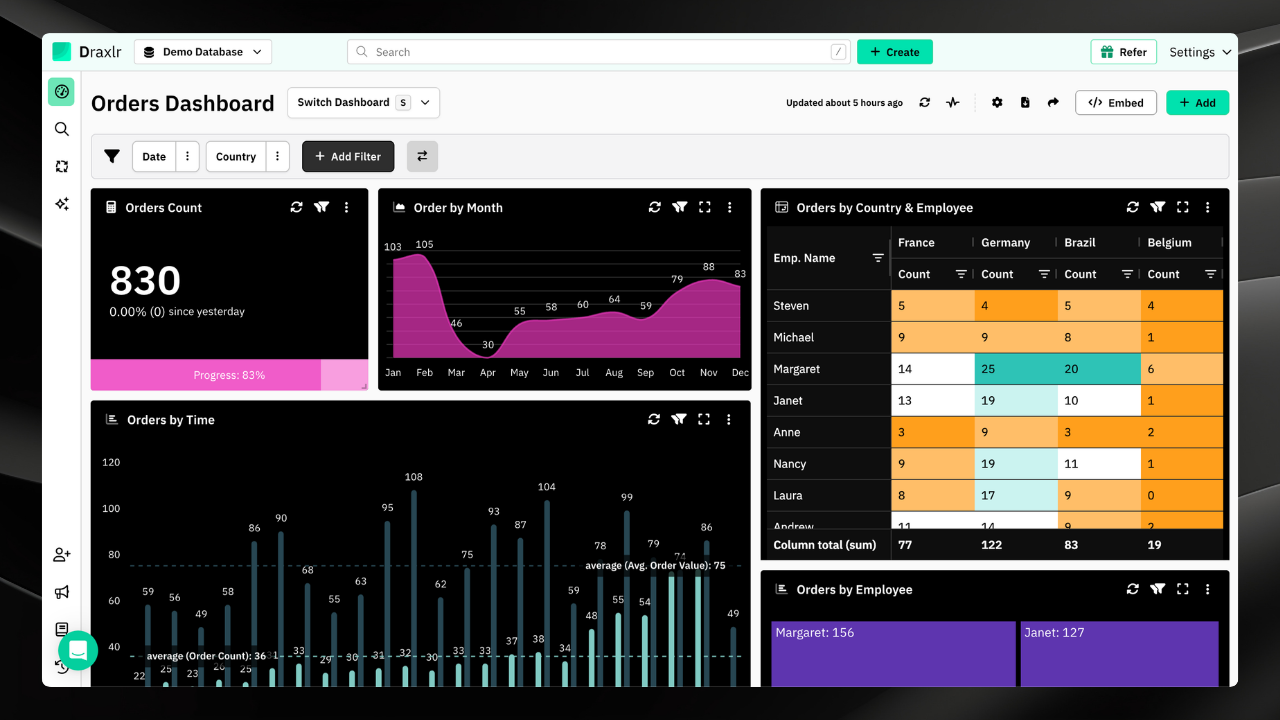
Draxlr is rapidly becoming the go-to Qlik alternative for data-driven teams who want the power of enterprise analytics without the enterprise headache. Built for the modern data stack, Draxlr lets you connect your database, build dashboards, and surface insights all without needing deep BI expertise or weeks of onboarding.
Where Qlik demands heavy configuration and dedicated admin resources, Draxlr gets you from data to dashboard in minutes. Its clean, intuitive interface is designed for both technical and non-technical users, making it ideal for cross-functional teams.
Draxlr connects directly to your SQL databases — PostgreSQL, MySQL, Redshift, BigQuery, Databricks, and more — with zero ETL friction. Its AI-assisted query builder means even non-SQL users can explore data independently, dramatically reducing the load on data engineering teams.
Why Draxlr Stands Out as a Qlik Alternative
Unlike Qlik, which requires significant setup and dedicated admins, Draxlr is self-serve from day one. Its pricing is transparent and accessible, making it a compelling choice for startups, scale-ups, and enterprises alike. The platform supports role-based access control, real-time query execution, scheduled slack and email reports, and embeddable dashboards all features that typically come at a premium in Qlik.
For teams that have struggled with Qlik's performance on large datasets, Draxlr's direct-to-warehouse architecture delivers fast query execution without data duplication or complex in-memory processing.
Pros:
- Fast, frictionless setup — live in minutes
- Direct SQL database connectivity (PostgreSQL, MySQL, Redshift, BigQuery, Databricks, and more)
- AI-assisted query builder
- Multi-level drill-through — deep, layered data exploration in clicks
- Pivot tables and advanced graphs — powerful data reshaping and visualization
- Embeddable dashboards for SaaS products
- Real-time query execution
- Clean, intuitive UI with a low learning curve
- Role-based access control and team collaboration
- Summary rows — instant totals and aggregations on any table
- Virtual columns — create computed fields without modifying your database
- Transparent, affordable pricing
- Quick customer support — fast, human responses (not just tickets)
Cons:
- Best suited for SQL-based data sources
- Prioritizes core analytics capabilities without unnecessary feature overload
Best For: Startups, scale-ups, and enterprise teams who want a modern, lightweight, and highly accessible Qlik alternative with direct database connectivity and AI-powered analytics.
2. Tableau
Best for Data Visualization
Tableau remains one of the most recognized names in data visualization. Acquired by Salesforce, it offers rich, interactive dashboards and broad data source connectivity. Tableau is particularly well-suited for teams that need beautiful, presentation-ready charts and reports for executive stakeholders or clients.
That said, Tableau comes with its own complexity and cost challenges. It's significantly more expensive than newer Qlik alternatives like Draxlr, and its data modeling capabilities can be difficult for non-technical users. For teams deeply embedded in the Salesforce ecosystem, however, it remains a strong option.
Pros:
- Industry-leading data visualization capabilities
- Large community and extensive documentation
- Strong Salesforce integration
- Flexible deployment (cloud, on-prem, hybrid)
Cons:
- High licensing cost
- Steep learning curve for advanced features
- Slower performance on very large datasets
- Limited self-serve experience for non-technical users
Best For: Enterprise teams that prioritize polished, presentation-quality dashboards and are already in the Salesforce ecosystem.
3. Microsoft Power BI
Best for Microsoft Teams
Power BI is Microsoft's flagship BI tool and a dominant force in the market. If your organization already relies on Microsoft 365, Azure, or Excel, Power BI integrates naturally and at a competitive price. It offers robust data modeling, interactive dashboards, and a wide range of connectors.
The major trade-off is that Power BI works best within the Microsoft ecosystem — outside of it, you can run into integration friction. It also has a well-documented performance ceiling when dealing with very large or complex datasets without premium capacity.
Pros:
- Excellent Microsoft and Azure integration
- Competitive pricing within Microsoft 365 subscriptions
- Familiar Excel-like experience for business users
- Large user base and a strong support community
Cons:
- Performance issues with large datasets without Premium
- Vendor lock-in to the Microsoft ecosystem
- Complex and confusing licensing tiers
- Limited flexibility outside the Microsoft stack
Best For: Organizations already running on Microsoft 365 or Azure that need a cost-effective BI tool with solid reporting capabilities.
4. Looker (Google)
Best for Google Cloud Users
Looker, now under Google Cloud, is a powerful BI tool built around LookML — its proprietary data modeling language. It excels at embedded analytics and is a go-to for software companies and product teams that need to surface data insights inside their applications.
Looker's main limitation is that LookML requires developer-level expertise to set up, making it not truly self-serve for most business users. It's also expensive, positioning it primarily as an enterprise play. For teams on Google Cloud, however, the integration is seamless and the real-time data access is a genuine differentiator.
Pros:
- Powerful embedded analytics capabilities
- Excellent Google Cloud and BigQuery integration
- Live connections to cloud data warehouses
- Strong data governance and modeling via LookML
Cons:
- Requires LookML knowledge — not self-serve for business users
- Very high cost — enterprise-only pricing
- Heavy dependency on the Google Cloud ecosystem
- Slow and complex to set up initially
Best For: Enterprise engineering and product teams building embedded analytics on Google Cloud infrastructure.
5. ThoughtSpot
Best for AI-Powered Search Analytics
ThoughtSpot takes a unique approach to analytics by allowing users to type questions in natural language and get instant, AI-powered answers. Instead of building dashboards manually, users search their data the way they'd search Google. This makes it an excellent Qlik alternative for business users who struggle with traditional BI tools.
ThoughtSpot's main limitation is cost and complexity at scale. It works best when data is well-structured, and like Looker, it targets enterprises with its pricing. For teams that need deep, exploratory analytics in a search-first format, it's a compelling option.
Pros:
- Natural language search delivers instant insights
- AI-powered analytics that surface hidden trends
- Strong cloud data warehouse integrations
- Low friction for non-technical business users
Cons:
- High enterprise pricing
- Less flexible for custom dashboard building
- Requires well-structured, clean data to work effectively
- Limited embedding options for SaaS products
Best For: Enterprise business teams that want a natural language, search-first analytics experience without writing queries.
6. Sisense
Best for Large-Scale Embedded Analytics
Sisense is a robust, developer-friendly BI platform built for organizations that need to handle large, complex datasets and embed analytics deeply into their own products. It's particularly popular among ISVs and SaaS companies that require highly customizable, white-labeled dashboards served to their end customers.
Where Sisense shines is in its scalability and backend flexibility — it can ingest and process massive volumes of data from disparate sources, making it one of the more powerful Qlik alternatives for technical teams. That said, the complexity and cost that come with this power mean it's not the right fit for teams looking for a quick, self-serve solution. Setup typically requires dedicated developer involvement, and pricing firmly places it in the enterprise tier.
Pros:
- Excellent scalability for large, complex datasets
- Strong embedded and white-label analytics capabilities
- Flexible data modeling and custom logic support
- Wide range of data source integrations
Cons:
- Requires technical expertise to set up and maintain
- High enterprise pricing — not suited for smaller teams
- Steeper learning curve compared to modern alternatives like Draxlr
- Slower to deploy than lighter-weight BI tools
Best For: Technical teams at ISVs and SaaS companies that need a highly scalable, deeply embeddable BI engine for large-scale data workloads.
Conclusion: Which Qlik Alternative Should You Choose?
The right Qlik alternative in 2026 depends on your team's size, technical capabilities, and budget. Here's a quick breakdown:
Best Overall Qlik Alternative — Draxlr Our top recommendation for most teams. Draxlr combines ease of use, direct SQL database connectivity, AI-powered querying, and transparent pricing — everything Qlik lacks for small to mid-sized teams. Whether you're a startup analyst or an enterprise data team lead, Draxlr gets you to insights faster with far less friction.
Best for Microsoft-Heavy Organizations — Power BI The natural choice if your team is deeply embedded in the Microsoft ecosystem. Cost-effective within Microsoft 365 subscriptions and handles most standard BI use cases well.
Best for Executive-Facing Visualizations — Tableau The gold standard when polished, publication-quality dashboards are the primary requirement — especially for client-facing or executive reporting.
Best for Large-Scale Embedded Analytics — Sisense Ideal for ISVs and SaaS companies that need a highly scalable, deeply embeddable BI engine and have the technical resources to implement and maintain it.
FAQs
1. What are the best Qlik alternatives in 2026?
For small to mid-sized businesses, Draxlr is the top choice. It offers a powerful feature set, AI-assisted querying, and transparent pricing without the enterprise complexity or cost that comes with Qlik, or Tableau.
2. Which Qlik alternative is best for AI powered analytics?
The best Qlik alternative for AI powered analytics is a platform that includes Text to SQL, conversational AI chat, automated insights, and intelligent data exploration. These capabilities reduce manual reporting effort and help teams generate faster, data driven decisions without heavy technical involvement.
3. Which Qlik alternative is best for non-technical users?
Look for platforms with natural language querying, intuitive drag-and-drop interfaces, and spreadsheet-like familiarity. Avoid tools requiring coding or complex data modeling.
4. Which Qlik alternative is best for small businesses?
Prioritize tools with transparent, consumption-based or per-user pricing, quick implementation, and no requirement for dedicated BI administrators. Scalability as you grow is also key.
5. Will switching from Qlik be complicated?
It depends on the complexity of your existing setup. Most modern BI platforms connect directly to your existing data sources, so you don't need to move your data. The main effort involves recreating dashboards and reports, which typically takes days to a few weeks depending on volume.
6. What's the cheapest Qlik alternative?
Look for platforms with consumption-based or low per-user pricing models. Open-source options can reduce licensing costs further, though they may require more setup and self-hosting effort.